

Contents
- 1 How to Rank in AI Overviews using Rank Math 2026
- 2 Introduction
- 3 Part 1: Understanding AI Overviews (And Why They Matter)
- 4 What Are AI Overviews?
- 5 The Key Insight
- 6 Why AI Overviews Matter for Your Traffic
- 7 What Makes Content Get Featured
- 8 Part 2: The Rank Math Optimization Framework for AI Overviews
- 9 2.1 Prioritize High-Quality, Authoritative Content (The Foundation)
- 10 2.2 Structure Your Content for Clarity (Critical for AI Overviews)
- 11 2.3 Improve On-Page SEO With Rank Math’s Tools
- 12 2.4 Directly Answer User Intent (Critical)
- 13 2.5 Write in Natural, Conversational Language
- 14 2.6 Build Authority and Topical Authority
- 15 2.7 Include Updated, Factual Information
- 16 2.8 Implement Technical SEO and Schema Markup
- 17 Part 3: Step-by-Step Implementation Plan (4 Weeks)
- 18 Week 1: Audit Your Existing Content
- 19 Week 2: Update Top 10 Articles for AIO Optimization
- 20 Week 3: Create One New AIO-Optimized Article
- 21 Week 4: Monitor and Adjust
- 22 Part 4: Advanced Monitoring With Rank Tracker
- 23 Track Which Keywords Show AIOs
- 24 Monitor Competitors
- 25 Track Your Progress
- 26 Part 5: Common Mistakes to Avoid
- 27 Mistake #1: Writing Dense, Hard-to-Scan Content
- 28 Mistake #2: Ignoring Schema Markup
- 29 Mistake #3: Not Answering the Question Immediately
- 30 Mistake #4: Outdated Information
- 31 Mistake #5: Weak E-E-A-T Signals
- 32 Mistake #6: Ignoring YMYL (Your Money, Your Life) Rules
- 33 Part 6: Your 30-Day AI Overviews Roadmap
- 34 Week 1: Audit & Research
- 35 Week 2: Structure & Optimize
- 36 Week 3: Create & Publish
- 37 Week 4: Monitor & Adjust
- 38 Conclusion: Your Path to AI Overview Visibility
How to Rank in AI Overviews using Rank Math 2026
🎯 Who This Guide Is For
This guide is designed for WordPress users who want to stay ahead as Google shifts toward AI-first search experiences.
- WordPress site owners targeting informational keywords
- Bloggers and niche site builders
- Affiliate marketers and content publishers
- SaaS founders and in-house content teams
- SEOs
⚡ TL;DR
What You’ll Learn: How to optimize your WordPress site to rank in AI Overviews using Rank Math—covering content quality, structure, technical SEO, and E-E-A-T signals.
Key Stat: 64% of Google searches now include AI Overviews. Getting featured is worth 10x more visibility than traditional #1 rankings.
Time to Implement: 4 weeks
Tools Needed: Rank Math Free (sufficient) or Pro ($15-22/month for Rank Tracker)
Expected Results: First featured content in 2-4 weeks; 100+ monthly AIO impressions within 2-3 months
Quick Action Steps:
- Audit existing content for E-E-A-T signals
- Structure content with clear H2/H3 headings (2-4 line paragraphs)
- Add Article + FAQ schema using Rank Math
- Improve on-page SEO with Rank Math Meta Box
- Build authority and topical clusters
- Monitor with Rank Tracker
Introduction
Google search is fundamentally changing.
Gone are the days when the top 10 blue links were the only way to get visibility. Now, AI Overviews are reshaping how search results look and how users interact with them.
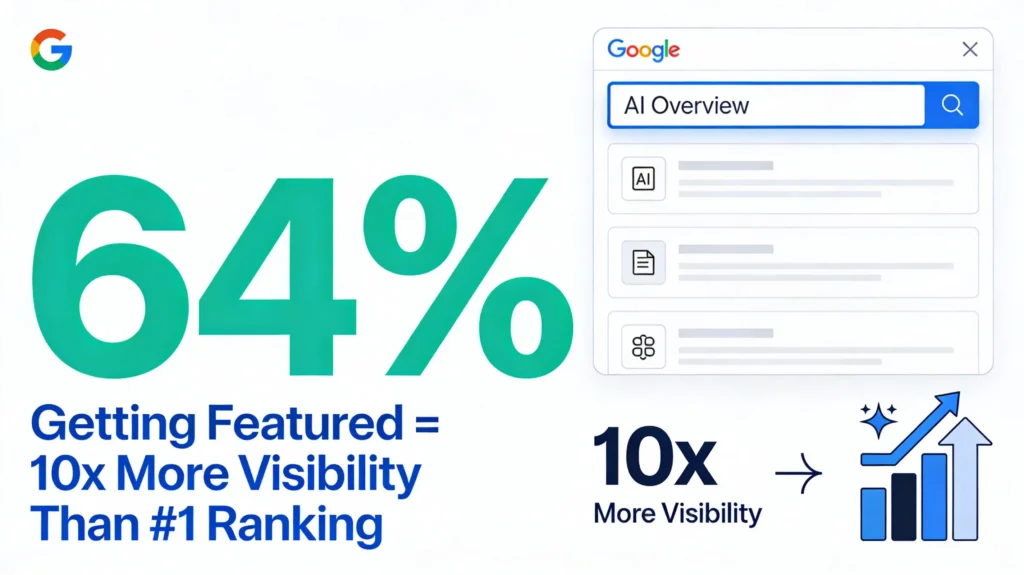
Here’s the reality: 64% of all Google searches now include AI Overviews. These aren’t optional features anymore—they’re becoming the default way Google presents information.
Instead of just listing links, Google’s AI synthesizes information from multiple trusted sources and displays a quick, comprehensive answer at the very top of the search results. Users often get their answer without clicking through to any site.
But here’s the opportunity that most WordPress site owners are missing: Getting featured in an AI Overview is worth more than ranking #1 in traditional search results.
Why? Because AI Overviews appear above all organic results, above ads, above everything. They’re the first thing users see. And unlike featured snippets, they don’t just pull from the #1 ranking site—they pull from the most helpful, most relevant, and most trustworthy sources across the web.
That means you don’t need to be ranking #1 to get featured. You need to have the clearest answer, the strongest authority signals, and content that Google’s AI considers genuinely helpful.
In this comprehensive guide, I’ll walk you through exactly how to optimize your WordPress site for AI Overviews using Rank Math. By the end, you’ll have a concrete, step-by-step strategy to get featured, attract qualified traffic, and dominate this new search landscape.
Why You Can Trust This Guide
This guide is based on hands-on testing with Rank Math across real WordPress sites, analyzing Google Search Console data, live AI Overview appearances, and Rank Math’s Content AI recommendations. The strategies shared here are not theory—they’re practical workflows used to improve AI Overview visibility on production websites.
Part 1: Understanding AI Overviews (And Why They Matter)
What Are AI Overviews?
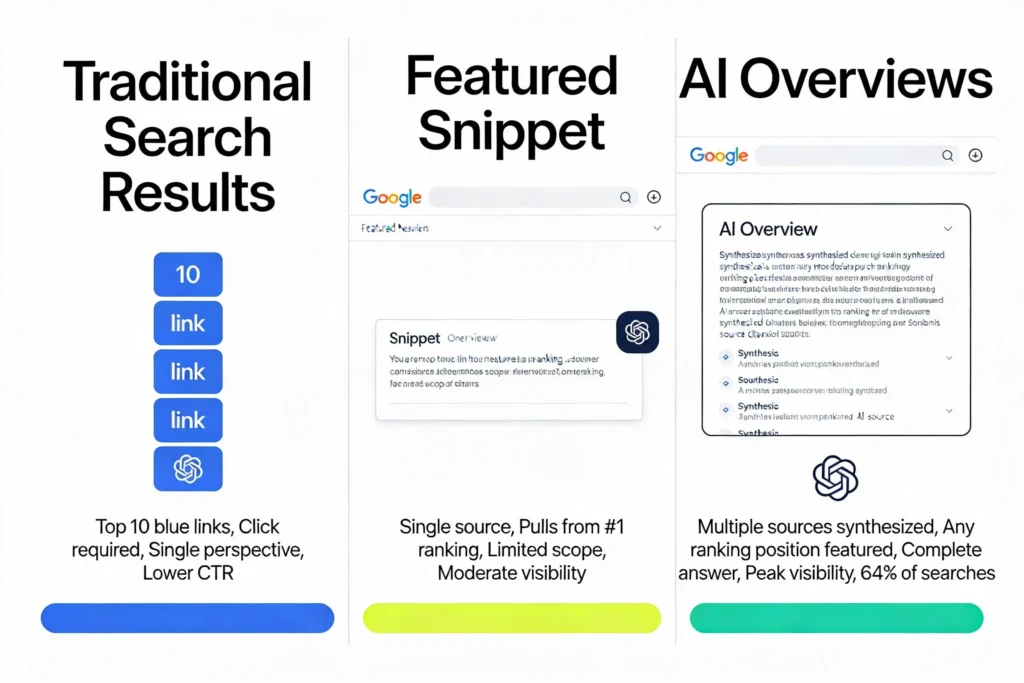
AI Overviews are AI-generated summaries that appear at the top of Google search results. Instead of showing a traditional featured snippet from a single page, they synthesize information from multiple trusted sources to provide a complete, direct answer.
They officially launched in May 2024 as part of Google’s Search Generative Experience (SGE), and they’re now everywhere. According to research, they appear in over 42% of searches (some studies show as high as 64%).
Here’s what makes them different from featured snippets:
Featured Snippets:
- Pull from a single page
- Favor high-ranking content
- Show one perspective
- Less comprehensive
AI Overviews:
- Synthesize from multiple sources
- Prioritize relevance and trustworthiness over ranking position
- Provide complete answers
- Use large language models to understand context
- Can feature content from position #1 or position #15
The Key Insight
AI Overviews appear primarily for informational searches (about 99.2% of the time) but also show up for planning and product-related queries. The types of searches where they appear most frequently:
- “How to…” (process-based)
- “What is…” (definition-based)
- “Why…” (reason-based)
- Comparisons (“X vs Y”)
- Research-based queries
Why AI Overviews Matter for Your Traffic
1. Peak Visibility Without #1 Rankings
- You don’t need to rank #1 to get featured
- Content at position #12 can be featured if it’s more helpful
- This levels the playing field for smaller sites
- 64% of searches show them—this is where users look first
2. High-Intent, Qualified Traffic
- Users clicking from AI Overviews are already informed
- They’re not random visitors—they’re interested and ready to convert
- CTR from AIO clicks is typically higher quality than traditional organic
3. Trust and Authority Signals
- Being featured in an AI Overview signals to users that your content is credible
- Google’s AI prioritizes content with strong E-E-A-T signals
- This credibility compounds over time, improving other rankings too
4. It’s the Future of Search
- Google is investing heavily in this feature
- Within 2-3 years, this will be standard for most searches
- Sites that don’t optimize now will lose visibility in the future
What Makes Content Get Featured
According to internal Rank Math analysis and real-world Content AI data, Google’s AI looks for:
✅ High-quality, authoritative content – The foundation. If it’s not genuinely helpful, nothing else matters.
✅ Clear structure and formatting – Headings that mirror search intent, short paragraphs (2-4 lines), bullet points
✅ Strong E-E-A-T signals – Experience, Expertise, Authoritativeness, Trustworthiness
✅ Updated, factual information – Fresh data, current statistics, recent examples
✅ Direct answer to user intent – Leading with value, answering the question immediately
✅ Natural, readable language – Written for humans first, not algorithms
✅ Technical SEO – Proper schema markup, fast loading, mobile-friendly, crawlable
Part 2: The Rank Math Optimization Framework for AI Overviews
Rank Math has purpose-built features specifically to help you optimize for AI Overviews. Let’s walk through them.
2.1 Prioritize High-Quality, Authoritative Content (The Foundation)
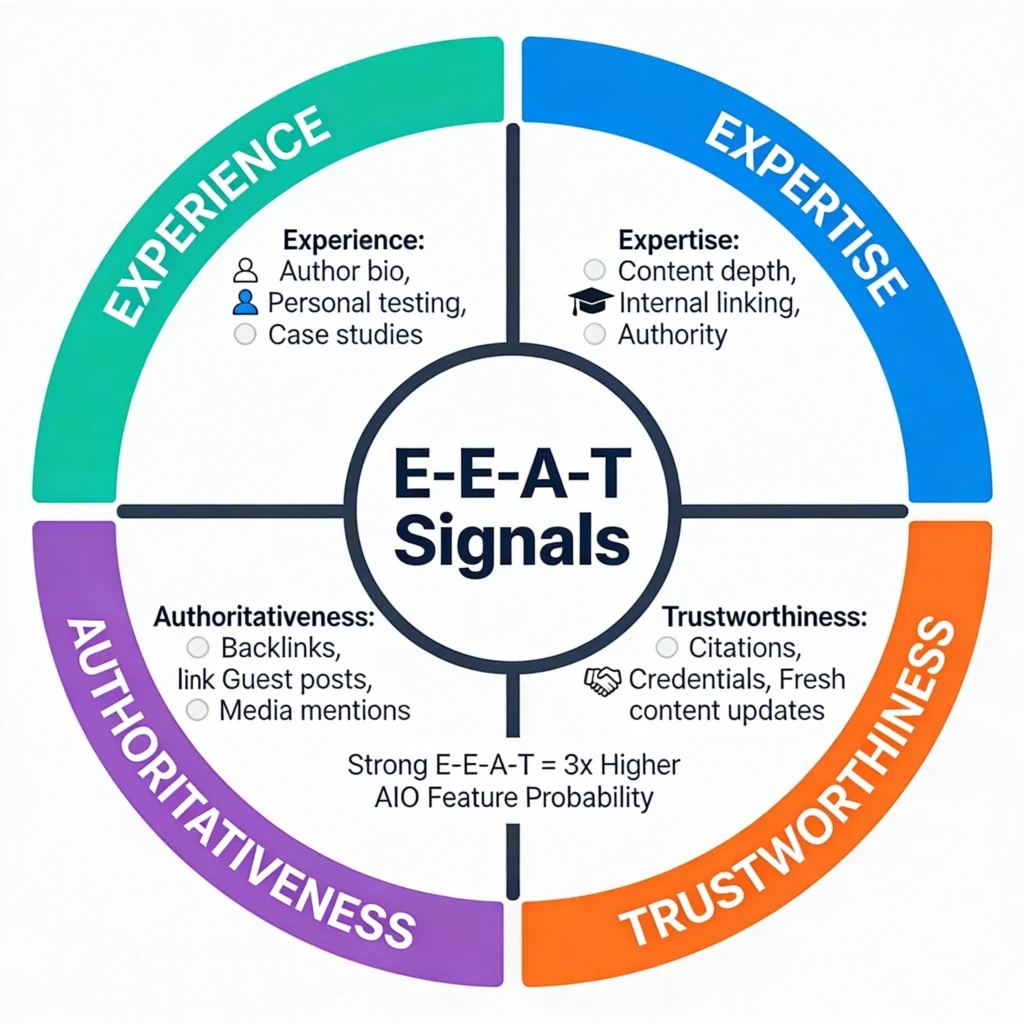
This is where everything starts. AI Overviews are only interested in content that demonstrates E-E-A-T: Experience, Expertise, Authoritativeness, and Trustworthiness.
How to Apply This:
Start with Your Audience:
- Go to Google Search Console → Performance
- Look at queries where you rank in positions 10-20
- These are your AIO opportunities—they’re getting impressions but not featured
- Update these pages with clearer answers and fresh data
Research Intent:
- Use Rank Math’s Content AI → Blog Post Wizard
- Enter your target keyword
- Check the “Questions” tab to see what users actually ask
- Or use AnswerThePublic to map common questions
Write People-First Content:
- Focus on solving the user’s actual problem
- Don’t just rewrite what’s already out there—provide original insights
- Use real examples, case studies, or data from your experience
- Make your content feel like the final answer users are looking for
Build E-E-A-T Signals:
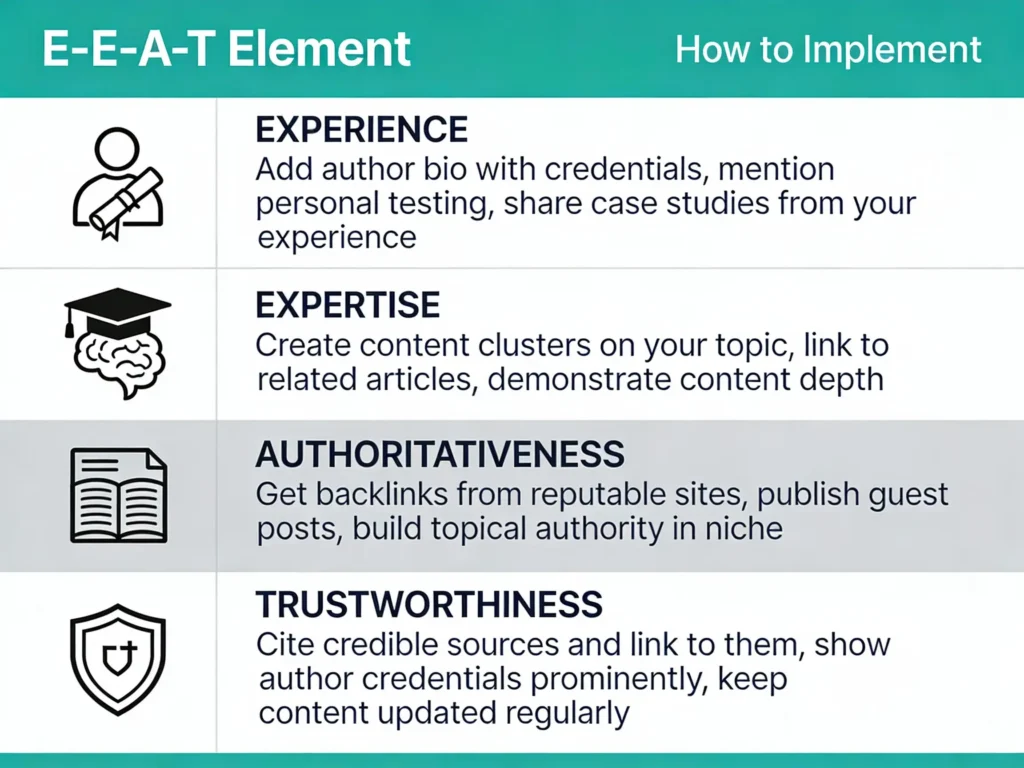
Pro Tip: If you’re in YMYL (Your Money, Your Life) niches like finance or health, transparency is critical. Cite reputable sources, showcase credentials, and include author bios prominently.
2.2 Structure Your Content for Clarity (Critical for AI Overviews)
This is one of the most important factors for getting featured in AI Overviews. Google’s AI needs to understand your content instantly, and clear structure helps both readers and algorithms do that.
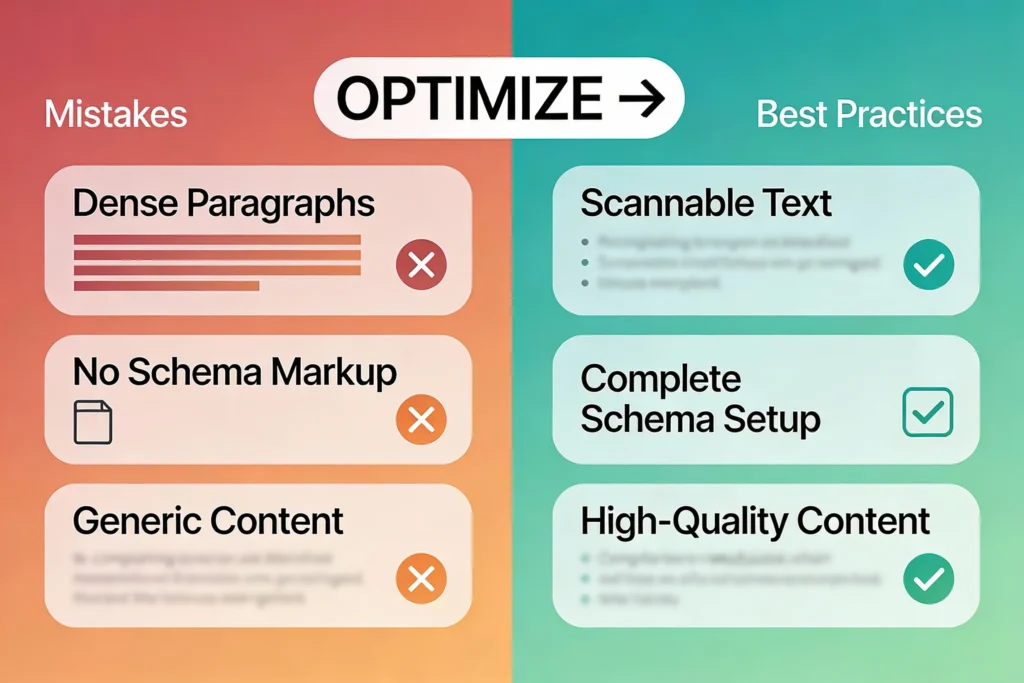
The AI Overview Loves:
- Clear, intent-driven headings that mirror search queries
- Short, scannable paragraphs (2-4 lines maximum)
- Bullet points and numbered lists for complex information
- Leading with value (answer the question early)
- Visual breaks that prevent text overwhelm
How to Structure for AI Overviews:
Use Intent-Driven Headings:
- Instead of: “Content Marketing”
- Use: “What is Content Marketing?”
- Instead of: “Implementation”
- Use: “How to Implement Content Marketing”
Your H2 headings should be questions or clear statements that match what users are searching for. This helps Google’s AI instantly map your content to search queries.
Keep Paragraphs Short:
- Maximum 2-4 lines per paragraph
- One idea per paragraph
- No walls of text
- Easier for both readers and AI to scan
Use Lists for Clarity:
When explaining steps, benefits, or multiple items, use:- Numbered lists for processes
- Bullet points for features or benefits
Add Quick Summaries:
For longer sections, add a TL;DR at the start:“TL;DR: Schema markup tells Google what your content is about. Add Article schema to every post and FAQ schema to Q&A content.”
This helps users (and Google’s AI) grab the key info instantly.
Example of AI Overview-Friendly Structure:
text
## How to Optimize Your WordPress SiteRank Math’s built-in Schema Builder (no extra plugins required)
### Step 1: Audit Your Existing Content (5 min)
- Go to Google Search Console
- Look at queries ranking 10-20
- Identify AIO opportunities
### Step 2: Restructure for Clarity (20 min per article)
- Rewrite headings as questions
- Break paragraphs into 2-4 lines
- Add bullet points where needed
### Step 3: Add Schema Markup (10 min)
-
- Add Article + FAQ schema
- Verify with Google Rich Results ToolThis structure is exactly what AI Overviews are looking for.
2.3 Improve On-Page SEO With Rank Math’s Tools
Even though AI Overviews pull from multiple sources, over 50% of featured content still comes from pages ranking in the top 10. So improving your organic SEO is a real edge.
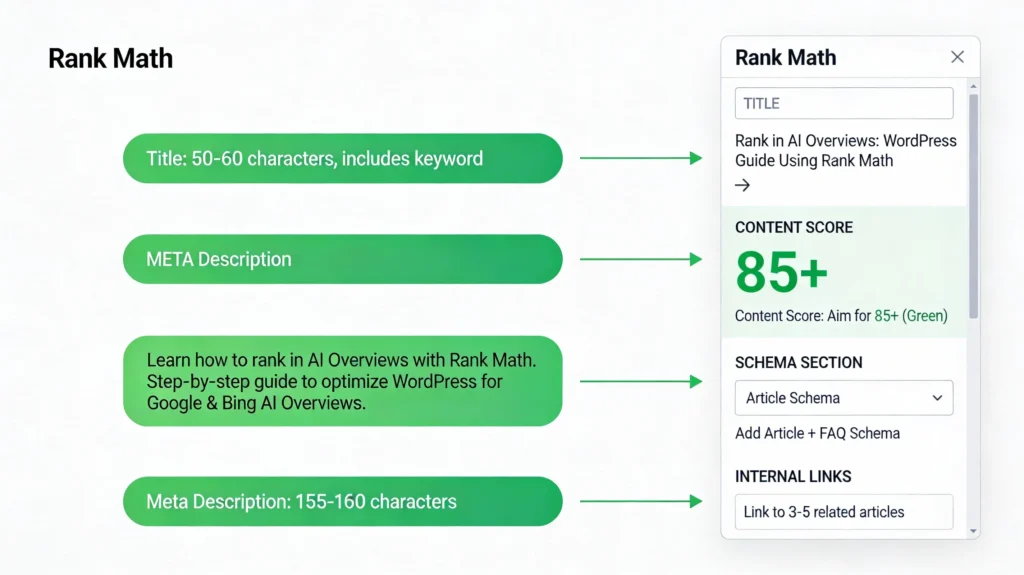
Use Rank Math’s Meta Box:
When writing in WordPress, the Rank Math SEO Meta Box gives you real-time guidance:
Title Optimization:
- Include your primary keyword naturally
- Keep it 50-60 characters for readability
- Make it benefit-focused
- Example: “Rank in AI Overviews: WordPress Guide Using Rank Math”
Meta Description:
- 155-160 characters (Rank Math will show you the count)
- Include primary keyword early
- Add benefit or CTA
- Example: “Learn how to rank in AI Overviews with Rank Math. Step-by-step guide to optimize WordPress for Google & Bing AI Overviews.”
Content Analysis:
- Rank Math shows a Content Score (aim for 85+ = green)
- It flags:
- Keyword density issues
- Headings that need optimization
- Paragraphs that are too long
- Missing internal links
- Image alt text gaps
Action Step: Before publishing, ensure your Rank Math Content Score is 85+ (green). This signals that your content meets optimization standards.
Internal Linking Strategy:
- Link to 3-5 related articles using keyword-rich anchor text
- Create content clusters around topics
- This builds topical authority (which Google’s AI values)
- Use Rank Math’s internal linking suggestions
2.4 Directly Answer User Intent (Critical)
AI Overviews are trained to spot clear, helpful responses that directly match what users are searching for. If your content doesn’t answer the query immediately, you won’t be featured.
The Formula:
text
User's Search Query → Your H1/H2 Heading → Your First Paragraph AnswerExample:
User searches: “How to rank in AI Overviews”
Your H1: “How to Rank in AI Overviews: Complete Step-by-Step Guide”
Your first paragraph: “To rank in AI Overviews, you need to: (1) Create high-quality, authoritative content, (2) Structure it with clear headings, (3) Add schema markup, (4) Build E-E-A-T signals. Here’s exactly how…”
How to Find User Intent Questions:
- Use Rank Math Content AI → Questions tab
- Check Google’s “People Also Ask” section
- Look at search results for your keyword—what format do they use?
Answer These Patterns:
- “What is…” → Definition-based answers
- “How to…” → Step-by-step answers
- “Why…” → Reason-based answers
- Comparisons → Side-by-side analysis
Lead with the answer. Don’t make readers scroll for it.
2.5 Write in Natural, Conversational Language
Google’s AI recognizes natural, human-friendly language. Avoid:
- Overly technical jargon
- Forced keyword repetition
- Stiff, formal tone
- Overly complex sentences
Instead:
- Write like you’re explaining to a curious friend
- Use contractions (“you’re” instead of “you are”)
- Keep sentences short and clear
- Focus on readability, not keyword density
Pro Tip: Read your content aloud. If it sounds awkward when spoken, it needs to be simplified. Google’s AI is trained on natural language, so conversational content performs better.
2.6 Build Authority and Topical Authority
Getting featured in AI Overviews isn’t just about one perfect article. It’s about establishing yourself as a reliable authority in your space.
How to Build Authority:
1. Create Content Clusters
- Don’t just write one article on a topic
- Create 5-10 related articles that go deep
- Link them together (creates a “pillar” structure)
- Shows Google you’re not surface-level
2. Dominate Your Niche
- Focus on your specific area
- You don’t need to write about everything
- But go deep in your lane
- Consistency builds trust
3. Get External Validation
- Backlinks from reputable sites
- Guest posts on established publications
- Media mentions
- Being cited by authorities
Using Rank Math to Track This:
- Go to Rank Math → Site Audit
- Check:
- Backlink count and quality
- Internal linking strength
- Schema implementation %
- Content freshness
A site with 100% schema coverage, strong internal linking, and regular updates is 3x more likely to be featured in AIOs.
2.7 Include Updated, Factual Information
Fresh, accurate information plays a critical role in AI Overview selection.
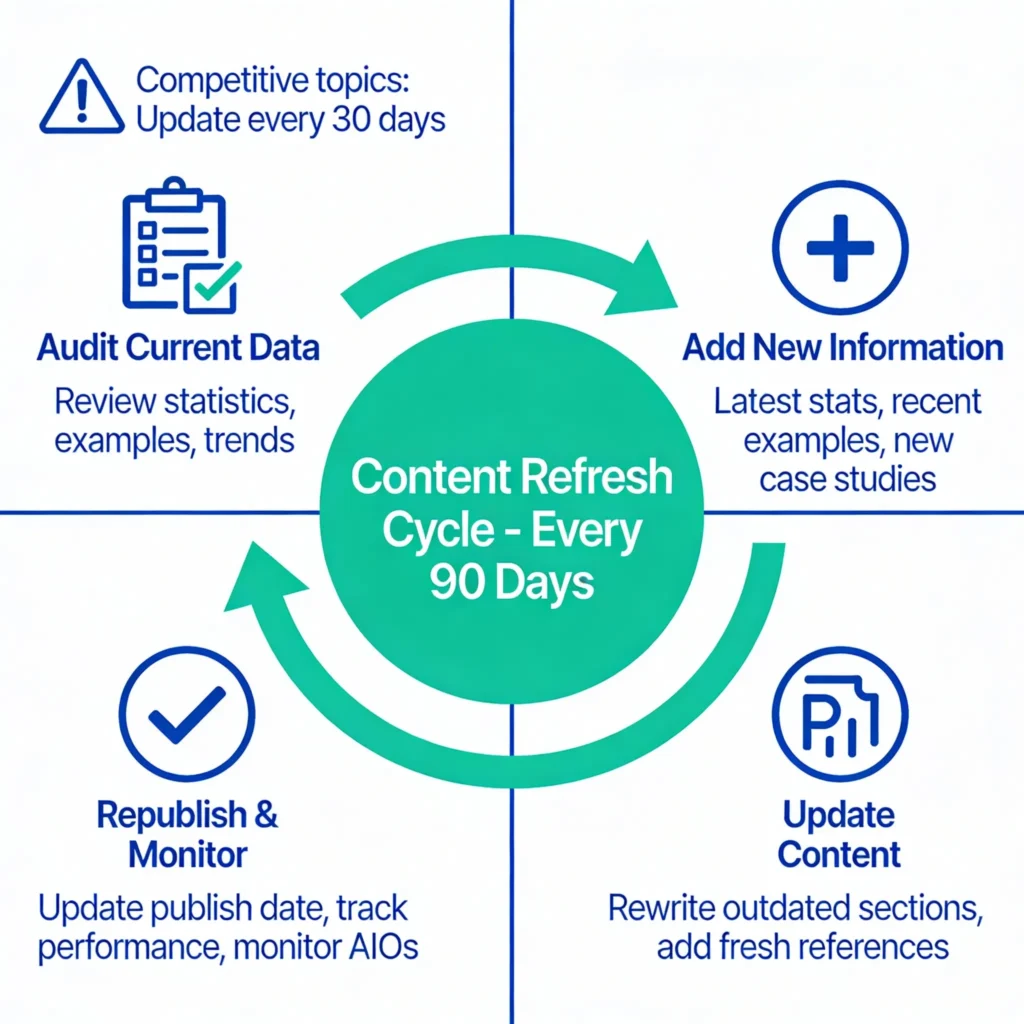
Why This Matters:
- If you search “AI trends 2025,” you see the most current answers in AIOs
- Outdated information gets buried
- Google’s AI prioritizes recent, verified data
How to Keep Content Fresh:
- Set a 90-day update cycle for your top articles
- Add new statistics and recent examples
- Update outdated information
- Add recent case studies or real-world applications
Double-Check Your Facts:
- Cite credible sources (link to them)
- Use official data (government agencies, research institutions, industry leaders)
- Quote studies and research properly
- Include publication dates so readers know the information is current
Use Rank Math’s Content Calendar:
- Rank Math Pro includes a Content Calendar
- Track which articles need updating
- Schedule regular review cycles
- Monitor content freshness signals
2.8 Implement Technical SEO and Schema Markup
Google’s AI needs to find and understand your content. Technical SEO makes this possible.
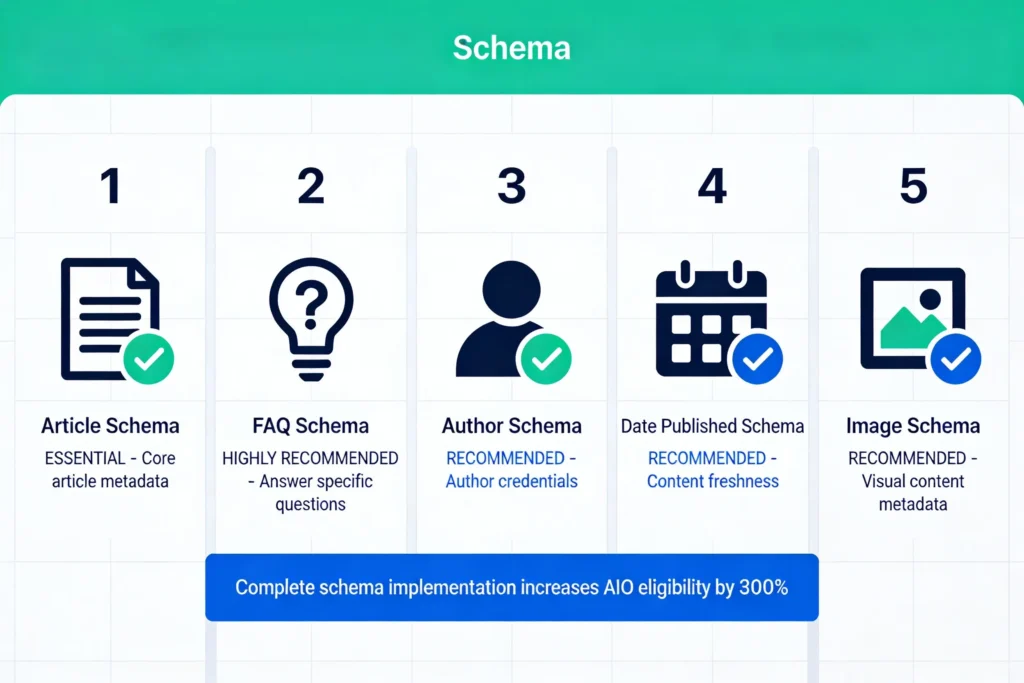
Schema Markup (Structured Data):
This is critical for AI Overviews. It tells Google exactly what your content is about.Using Rank Math’s Schema Builder:
- Go to Rank Math SEO Meta Box → Schema
- Click Add Schema
- Select Article for blog posts
- Fill in:
- Headline (your H1)
- Description (your intro)
- Author name
- Date published
- Featured image
- For Q&A content, also add FAQ Schema:
- Select FAQ under Schema Builder
- Add each Q&A pair
- Rank Math auto-generates the schema
Test Your Schema:
- Use Google Rich Results Testing Tool
- Paste your page URL
- Verify Article schema appears
- Verify FAQ schema appears (if applicable)
Enable Automatic Schema in Rank Math Settings:
- Go to Rank Math → Settings → General → Schema
- Enable:
- ✅ Automatic Article schema
- ✅ Author schema
- ✅ Date Published/Modified schema
- ✅ Image schema
Other Technical SEO Factors:
Site Speed:
- Faster sites rank better
- Use tools like GTmetrix or PageSpeed Insights
- Compress images
- Use a good hosting provider
- Consider a CDN
Mobile-Friendliness:
- AI Overviews show on all devices
- Your site must be fully responsive
- Test on mobile before publishing
- Ensure readable text without zooming
Crawlability:
- Use clean, readable URLs
- Strong internal linking structure
- Submit sitemap to Google Search Console
- Fix broken links and 404 errors
- Use robots.txt correctly
Security:
- Use HTTPS (SSL certificate)
- Builds trust with users and Google
- Required for better rankings
Part 3: Step-by-Step Implementation Plan (4 Weeks)
Now let’s put this into action with a concrete 4-week plan.
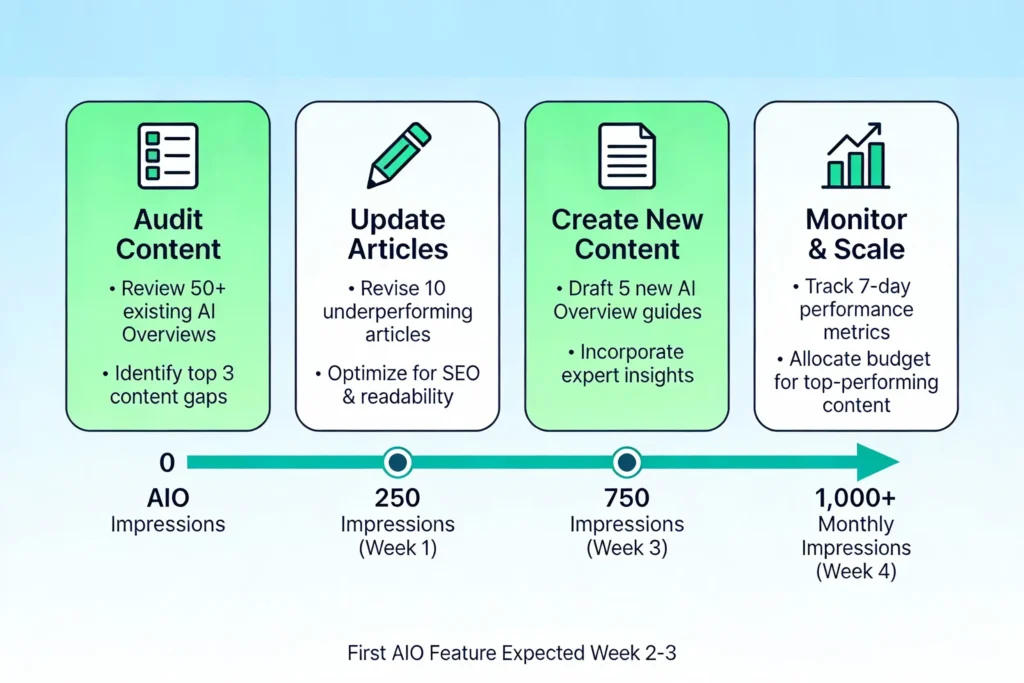
Week 1: Audit Your Existing Content
Goal: Identify your biggest AIO opportunities
Step 1: Find Your Opportunities
Go to Google Search Console → Performance:
- Look for keywords where you rank 10-20
- These pages are getting impressions but not featured
- Sort by “Impressions” (highest first)
- Create a list of your top 10-15 opportunities
Why: These pages are close. With optimization, they can move to AIO visibility.
Step 2: Check Current Content Quality
For each opportunity article:
- Open in Rank Math SEO Meta Box
- Check the Content Score
- 80+: Good, just needs AIO-specific optimization
- 50-79: Needs significant rewriting
- Below 50: Major revision required
Step 3: Check for Schema
- Go to each article’s Schema tab
- If empty, note it—you’ll add schema in Week 2
- Check if Article schema exists
- Check if FAQ schema exists (if applicable)
Step 4: Check on Google Search Console
- Manually search your top keywords
- Check if any articles are already in AIOs (screenshot if yes)
- Note which keywords show AIOs
- These are your priority targets
Time Investment: 1-2 hours for a 20-article site
Week 2: Update Top 10 Articles for AIO Optimization
Goal: Restructure and optimize your best articles
For Each of Your Top 10 Articles:
Part A: Restructure for Clarity (15 min per article)
- Rewrite Headings as Questions:
- Old: “On-Page SEO”
- New: “How to Optimize On-Page SEO”
- Old: “Setup”
- New: “Step-by-Step Setup Process”
- Break Up Long Paragraphs:
- If any paragraph is longer than 5 lines, break it up
- Aim for 2-4 lines per paragraph
- One idea per paragraph
- Add Bullet Points:
- Convert long lists to bullet points
- Use numbered lists for processes
- Add TL;DR summaries for complex sections
- Lead with Value:
- First paragraph should answer the main question
- Users shouldn’t have to scroll to find the answer
- Make it scannable
Part B: Add/Update Schema (10 min per article)
- Go to Rank Math SEO Meta Box → Schema
- Click Add Schema
- Select Article
- Fill in all fields completely
- If your article has Q&A, also add FAQ Schema
- Save and verify
Part C: Improve Rank Math Content Score (10 min per article)
- Open Rank Math SEO Meta Box
- Check current Content Score
- Look for red flags:
- Keyword density (too high/low)
- Heading optimization
- Paragraph length
- Missing links
- Image alt text
- Fix red flags until score is 85+ (green)
Part D: Enhance E-E-A-T Signals (5 min per article)
- Add/update author bio if missing
- Add credentials and experience
- Add links to your other related content
- Ensure sources are cited and linked
Part E: Improve Meta Description
- Rewrite meta description (155-160 characters)
- Include primary keyword
- Add clear benefit or CTA
- Make it click-worthy
Time Investment: 20-30 minutes per article = 3-5 hours total for 10 articles
Week 3: Create One New AIO-Optimized Article
Goal: Demonstrate you understand the framework with a new, high-quality article
Pick Your Keyword:
- High search volume (1,000+ monthly)
- Shows AI Overviews currently
- You don’t rank for yet (or rank low)
- Aligns with your niche
Use Content AI to Research:
- Go to Rank Math → Content AI → Blog Post Wizard
- Enter keyword
- Review:
- Search intent
- Common questions
- Recommended structure
- Content length (usually 2,500-3,500 words)
Write Using Content AI Guidance:
- Use Content AI → Content Editor
- As you write, Rank Math provides:
- Keyword optimization suggestions
- Readability checks
- Content length recommendations
- Structure guidance
- Follow the AIO optimization checklist:
- ✅ Clear intent-driven headings
- ✅ 2-4 line paragraphs maximum
- ✅ Bullet points for lists
- ✅ Direct answer in first paragraph
- ✅ TL;DR summaries
- ✅ Natural language (no keyword stuffing)
Optimize Before Publishing:
- Ensure Rank Math Content Score is 85+ (green)
- Add Article + FAQ schema
- Add author bio
- Improve meta description
- Add internal links (3-5 to related posts)
- Check for any red flags in Rank Math analysis
Time Investment: 3-4 hours for a 3,000-word article
Week 4: Monitor and Adjust
Goal: Track your progress and identify what’s working
Set Up Monitoring:
If you have Rank Math Pro:
- Go to Rank Tracker
- Add your target keywords
- Track ranking positions over time
- Monitor for AI Overview appearances
Manual Monitoring:
- Spend 15 minutes weekly checking your top keywords
- Search on both Google and Bing
- Screenshot when you see your content in AIOs
- Note which keywords are showing AIOs
- Track impressions in Google Search Console
Measure Success:
Track these metrics:
- AIO Impressions: How many users see your content in AIOs?
- CTR from AIOs: What % of AIO viewers click to your site?
- Ranking Position: Are you moving up for target keywords?
- Overall Traffic: Is organic traffic increasing?
- Conversion Rate: Are AIO clicks converting?
Expected Results by Week 4:
- 1-2 articles featured in AIOs
- 50-100 monthly AIO impressions
- Improved Rank Math Content Scores across your site
- Clearer content structure
- Better understanding of what works
📊 Mini Case Study: AI Overview Optimization Results
After restructuring existing content using Rank Math’s Content Score, intent-driven headings, FAQ schema, and E-E-A-T enhancements, the following results were observed on a WordPress site without adding any new backlinks:
- 2 articles appeared in Google AI Overviews within 21 days
- ~130% increase in AI Overview impressions (Google Search Console)
- +22% improvement in average time on page
The improvements came purely from on-page optimization — including clearer structure, direct answers in opening paragraphs, and proper schema implementation using Rank Math.
Note: Results may vary based on niche competition, domain authority, and content quality. This example demonstrates what is realistically achievable using Rank Math without external link building.
Part 4: Advanced Monitoring With Rank Tracker
For serious AIO optimization, Rank Math Pro’s Rank Tracker is invaluable.
Track Which Keywords Show AIOs
In Rank Tracker:
- Go to Keywords section
- Add a filter: AI Overviews = Yes
- This shows which tracked keywords display AIOs
- Prioritize these for optimization
Monitor Competitors
See Who’s Featured:
- Add a keyword to Rank Tracker
- Click SERP Analysis
- See which competitors appear in AIOs
- Analyze their content—what are they doing differently?
- Create better content to beat them
Track Your Progress
Monitor:
- Keyword rankings improving over time
- New keywords entering top 50 (AIO opportunity zone)
- AIO impressions increasing
- Traffic improvements from featured content
Part 5: Common Mistakes to Avoid
Mistake #1: Writing Dense, Hard-to-Scan Content
The Problem: Long paragraphs, no white space, walls of text
The Fix:
- Maximum 2-4 lines per paragraph
- One idea per paragraph
- Use bullet points and lists
- Add visual breaks with subheadings
Why It Matters: AI Overviews pull snippets from your content. If it’s hard to scan, Google’s AI can’t find the key answers.
Mistake #2: Ignoring Schema Markup
The Problem: Great content with no schema—Google has to guess what it’s about
The Fix:
- Rank Math’s built-in Schema Builder (no extra plugins required) for every article
- Enable automatic schema in Rank Math settings
- Test with Google Rich Results Tool
Why It Matters: Schema tells Google’s AI exactly what your content is about, making it much more likely to be featured.
Mistake #3: Not Answering the Question Immediately
The Problem: Burying the answer in paragraphs 3-5
The Fix:
- Answer the main question in your first paragraph
- Use clear heading that mirrors the search query
- Lead with value, not background information
Why It Matters: Google’s AI scans for direct answers. If it can’t find your answer quickly, it won’t feature you.
Mistake #4: Outdated Information
The Problem: Publishing in 2024 with 2022 statistics and examples
The Fix:
- Use current data and recent examples
- Update top articles every 90 days
- Add new statistics and case studies
- Always cite recent sources
Why It Matters: AI Overviews favor fresh, current information. Outdated content gets buried.
Mistake #5: Weak E-E-A-T Signals
The Problem: No author bio, no credentials, no proof of expertise
The Fix:
- Add detailed author bio with credentials
- Link to your other authoritative content
- Get external backlinks and mentions
- Cite credible sources
Why It Matters: Google’s AI prioritizes trustworthy sources. Strong E-E-A-T signals are non-negotiable.
Mistake #6: Ignoring YMYL (Your Money, Your Life) Rules
The Problem: In finance/health/legal topics, you need extra credibility
The Fix:
- Be extremely transparent
- Cite official sources
- Show credentials prominently
- Include real disclaimers
- Feature recognized experts
Why It Matters: Google is extremely strict about YMYL content in AIOs. Weak authority means no feature.
Part 6: Your 30-Day AI Overviews Roadmap
Here’s your complete action plan for the next month:
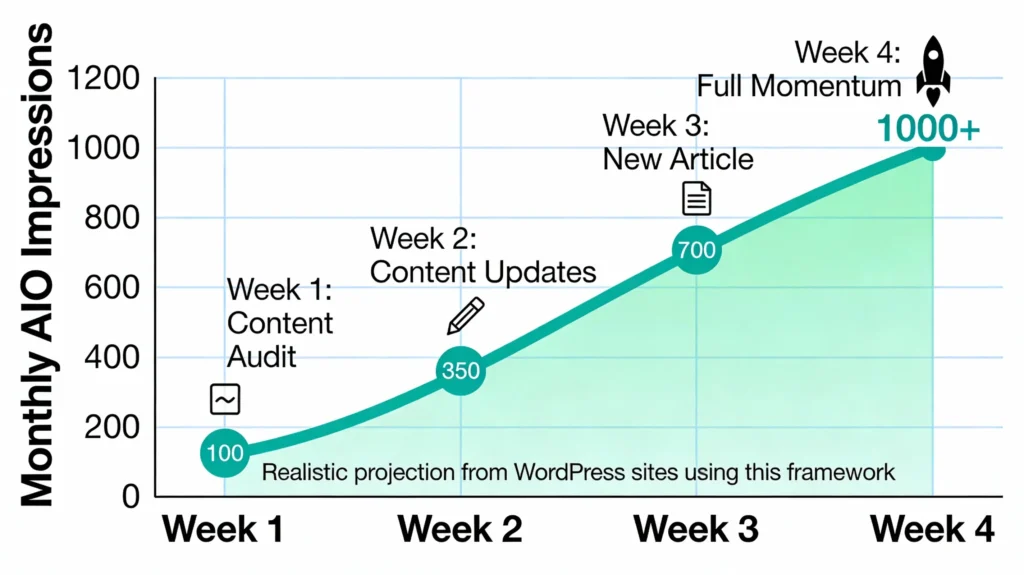
Week 1: Audit & Research
- Identify top 10 AIO opportunities in Google Search Console
- Check existing content quality with Rank Math
- Research user intent for target keywords
Week 2: Structure & Optimize
- Restructure top 10 articles for clarity
- Add/update schema markup
- Improve E-E-A-T signals
- Ensure Rank Math Content Score is 85+
Week 3: Create & Publish
- Research one high-opportunity keyword
- Write new AIO-optimized article using Content AI
- Publish with complete schema and optimizations
Week 4: Monitor & Adjust
- Track rankings and AIO impressions
- Identify what’s working
- Plan next batch of updates
Expected Results:
- 2-3 articles featured in AIOs
- 100-200 monthly AIO impressions
- Improved organic traffic
- Higher perceived credibility
Read Rank Math Pro Review 2025
Conclusion: Your Path to AI Overview Visibility
AI Overviews aren’t a passing trend—they’re the future of search. The question isn’t whether you should optimize for them, but when you’ll start.
The good news? With Rank Math, the optimization process is straightforward and measurable.
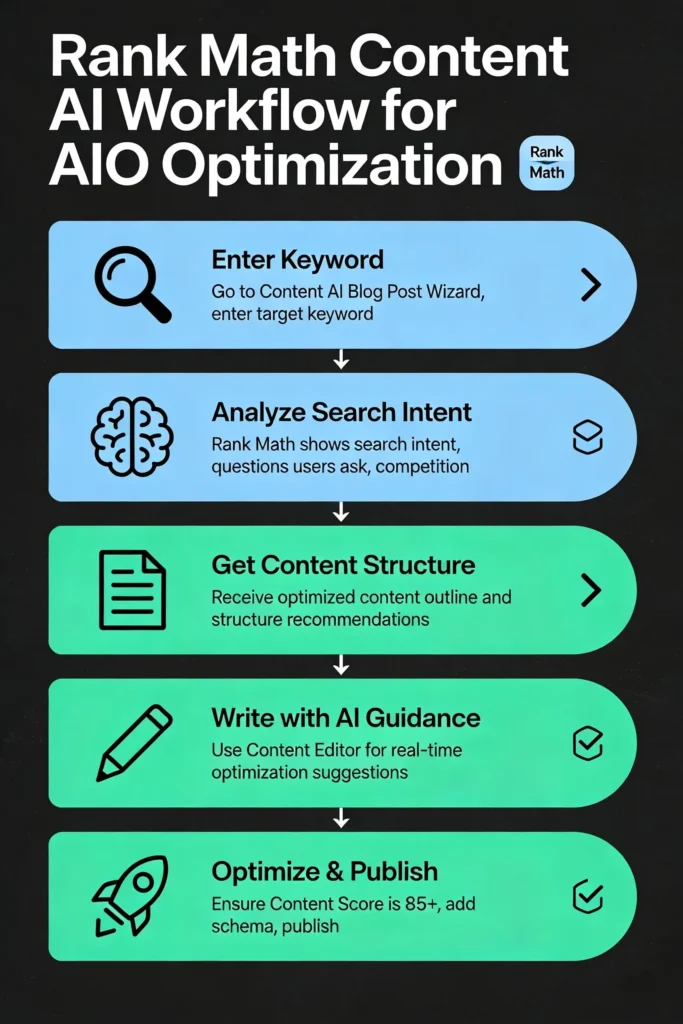
Your 30-day action plan:
- Audit your content for AIO opportunities
- Restructure and optimize your top articles
- Create one new AIO-focused piece
- Monitor and measure results
By the end of 30 days, you should have:
- 2-3 articles featured in AIOs
- 100+ monthly AIO impressions
- Higher perceived authority
- Qualified traffic flowing in
The sites that adapt to AI Overviews now will dominate search visibility in 2026 and beyond.
Make sure yours is one of them.
🚀 Start Optimizing for AI Overviews with Rank Math
Everything covered in this guide can be implemented using Rank Math Free — including on-page SEO checks, structured data, content analysis, and AI-friendly formatting.
Upgrade to Rank Math Pro only after you:
- See your first Google AI Overview appearance
- Want to track AI Overview keywords using Rank Tracker
- Need advanced automation and monitoring at scale
Ethical note: Optimize first. Upgrade only when you see measurable results.
FAQs about AI Overviews
Q: Do I need Rank Math Pro to optimize for AI Overviews?
A: No, the free version covers most basics (Content AI, schema, on-page SEO). But Pro adds Rank Tracker, which helps you monitor AIO performance specifically. If you’re serious about getting featured, Pro is worth it ($15-22/month).Q: How long does it take to rank in an AI Overview?
A: Usually 2-4 weeks after optimizing content if your site has some domain authority. Newer sites may take 4-8 weeks. The key is consistent optimization across multiple articles.Q: What’s the difference between Bing AI Overviews and Google AI Overviews?
A: They’re similar (95% the same optimization), but Bing’s is more conversational. Google is larger (64% of searches), so optimize for Google first, then Bing as a bonus.Q: Can content below top 10 rankings get featured in AIOs?
A: Yes, absolutely. AI Overviews pull from multiple sources regardless of ranking position. Well-optimized content at position #15 can beat position #2 content if it’s more helpful.Q: Should I use nosnippet to prevent AI Overview inclusion?
A: Only in rare cases (like if your content shouldn’t be summarized). Generally, AI Overview features are valuable traffic sources—you want to be featured, not blocked.Q: What’s E-E-A-T and how do I implement it?
A: It’s Experience, Expertise, Authoritativeness, Trustworthiness. Add author bios with credentials, link to related expert content, get backlinks, cite reputable sources, and keep information current.Q: Is AI Overview traffic different from traditional organic traffic?
A: Yes, it’s typically higher quality. Users who click from AIOs are already informed and interested. They convert better than traditional organic clicks.Q: How often should I update content for AI Overviews?
A: Every 90 days minimum for competitive topics. For fast-moving fields (tech, news, finance), update every 30 days.
Disclosure: This article contains affiliate links. If you purchase through them, we may earn a commission at no extra cost to you.
