
Contents
- 1 Getting Started Without the Overwhelm: Building Your First Business Website With the WordPress.com AI Website Builder
- 2 Why Many Small Business Owners Delay Building a Website
- 3 A Different Way to Launch a Business Website
- 4 When Business Owners Usually Look for This Solution
- 5 How the WordPress.com AI Builder Helps Business Owners Start Faster
- 6 Seeing a Real Site Instead of a Blank Page
- 7 Keeping Control After the Site Launches
- 8 Built on WordPress From the Start
- 9 Launch First, Improve as You Go
- 10 Why More Small Businesses Are Taking This Approach
- 11 Small Business Case Study: Launching a Local Service Website Without Hiring a Freelancer
- 12 🎬 Watch the Full Video Tutorial
- 13 Trust-Building FAQ
- 14 Is this just another AI gimmick builder?
- 15 What happens if my business grows later?
- 16 Do I need to manage hosting or security?
- 17 Can I update my website myself after it launches?
Getting Started Without the Overwhelm: Building Your First Business Website With the WordPress.com AI Website Builder
Why Many Small Business Owners Delay Building a Website
Many small business owners know they need a website. They understand that customers search online before making decisions. They also know that a website builds credibility in a way that social media profiles cannot.
Yet launching that website often gets postponed. The reason is simple. Building a website traditionally required outside help. Designers, freelancers, or agencies handled the setup. They chose the layout, configured the pages, and handled the technical work behind the scenes.
Small business owners can now launch a professional website without hiring a freelancer. The WordPress.com AI Website Builder creates a structured site from a simple description, and you can edit the text, images, and layout yourself as your business grows.
Describe your site. Watch it build →For large projects, that model still makes sense. But for smaller businesses, the process can feel slow and expensive. A local service provider may only need a simple website. Something that explains what they do, where they operate, and how customers can contact them. Yet even a small project can take weeks when it involves hiring someone else.
Cost becomes another factor. A basic site can still require a significant upfront budget when freelancers are involved.
One hidden problem many business owners discover later: When someone else builds the website, updates often require going back to the same person. Changing text, replacing photos, or adding a new service page can turn into another small project. The business owner may start to feel locked out of their own website. Because of this, some businesses delay launching a site entirely and rely only on social media profiles or simple listing pages instead.
These tools help with visibility, but they do not provide the same level of credibility or ownership as a dedicated website. This is why many small business owners are now exploring a different approach. Instead of hiring someone to build the entire site, they start the process themselves using AI assisted tools that guide them through the setup.
A Different Way to Launch a Business Website
To see how the entire process works in practice, you can follow this walkthrough: From Idea to Live Website in Minutes , which shows how a website can be generated step by step using the WordPress AI builder.
Starting a website used to feel like a technical project. Today it can feel more like describing your business. Modern AI builders allow users to explain what kind of website they need. From that description, the system generates a structured starting point. The homepage appears. Sections appear. Suggested text appears.
Instead of staring at an empty page, the business owner begins with a working layout. This shift is important. The hardest part of creating a website has always been the beginning. The blank screen. The uncertainty about where to start. AI builders remove that barrier.
The WordPress.com AI Website Builder follows this approach. The system asks a few questions about the business and then generates the first version of the website directly inside WordPress.
The result is a structured website foundation built using WordPress blocks and managed infrastructure. That foundation can then be refined, edited, and expanded by the business owner. The AI helps with the early structure. The owner keeps full control over the final result.
When Business Owners Usually Look for This Solution
For many small businesses, the need for a website appears during a specific moment. Sometimes it happens when launching a new service. A consultant may start offering workshops and realize that clients need a place to learn more.
Sometimes it happens during a rebrand. A business updates its name, messaging, or visual identity and needs a website that reflects the new direction.
In other cases, the trigger is seasonal. A service provider preparing for a busy season may want a simple website that explains packages, hours, and contact options.
At that moment, hiring a freelancer might feel too slow or too expensive for what is needed. The business owner wants something else. A professional looking site that can be launched quickly and improved over time. Most importantly, they want a site they can control themselves.
How the WordPress.com AI Builder Helps Business Owners Start Faster
The description you write for the AI builder matters more than many beginners realize. This guide shares several AI website builder prompt examples that help generate stronger website structures.
The WordPress.com AI Website Builder simplifies the process by guiding you through a few quick questions about your business. Based on your answers, the system generates the initial pages and layout for your site. The following walkthrough shows how a simple business website can be created step by step.
Step-by-Step: Creating a Business Website with the WordPress.com AI Website Builder
Enter prompt
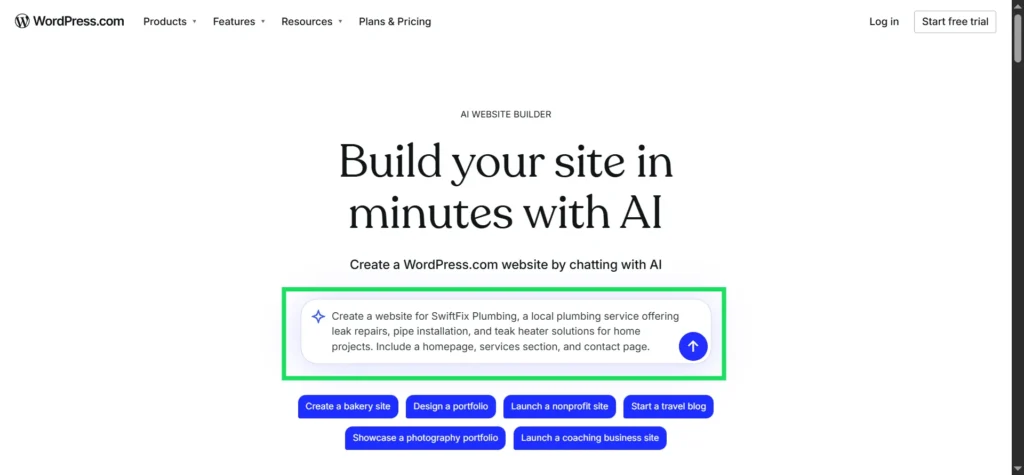
Figure: Entering a simple prompt in the WordPress.com AI Website Builder to generate a business website.
Choose location
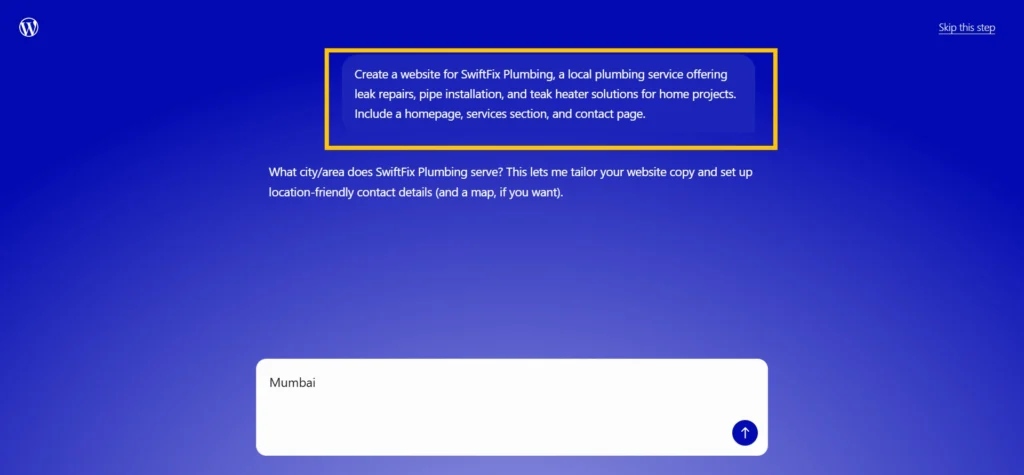
Figure: The AI builder asks for the business service area so it can generate location-friendly content for the website.
Add description
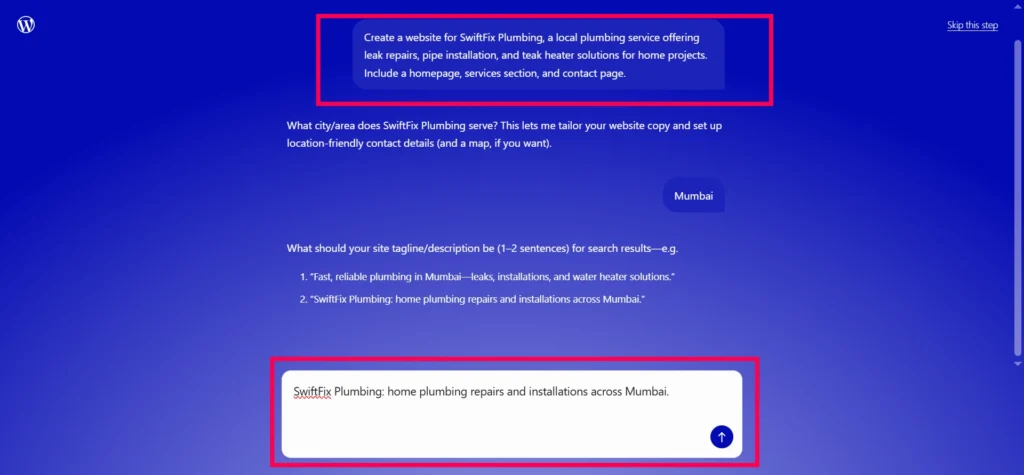
Figure: Providing a short business description helps the AI generate relevant homepage text and service sections.
Select site title
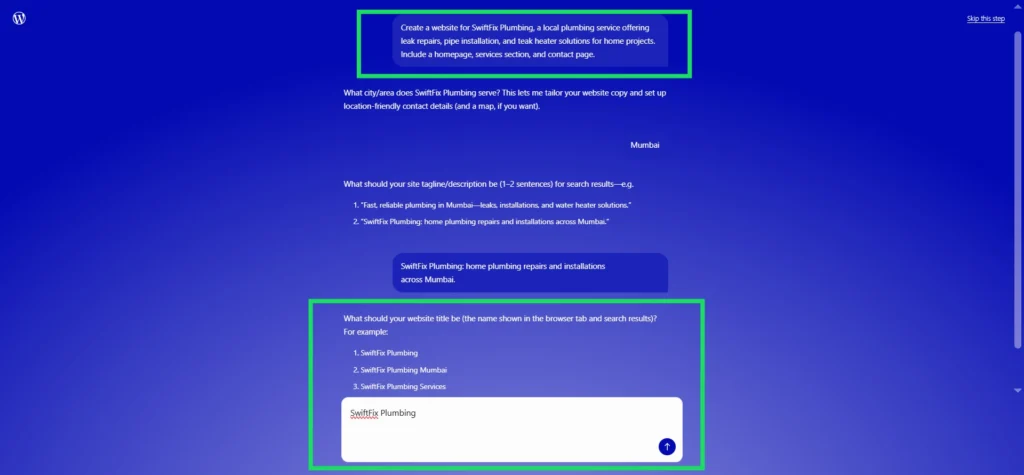
Figure: Selecting the website title that will appear in the browser tab and search results.
Click Create site
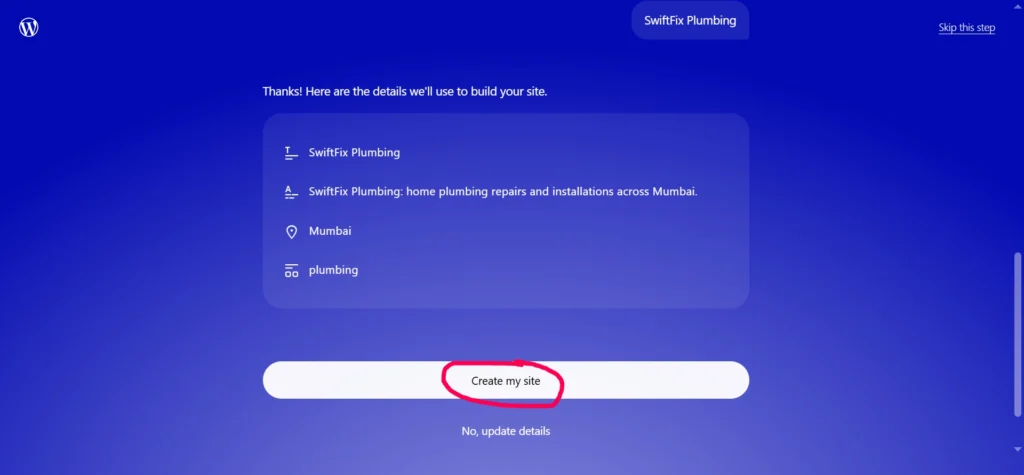
Figure: Clicking Create my site to start generating the website based on the prompt and business information provided.
Site generating
Figure: The WordPress.com AI builder begins creating the website layout, pages, and initial content.
Generated website
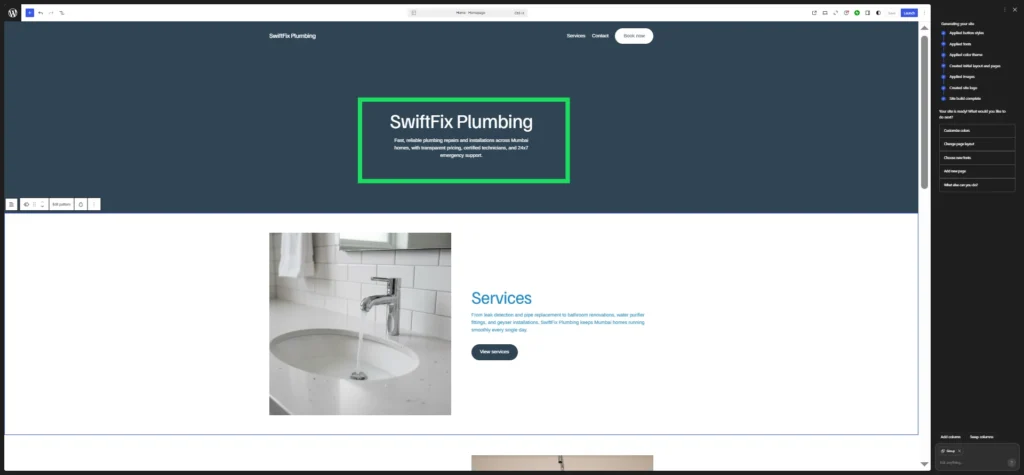
Figure: The AI-generated homepage preview for SwiftFix Plumbing. Within minutes, the WordPress.com AI Website Builder creates a structured layout with a headline, service section, and navigation that can be refined and customized before publishing..
The AI-generated layout provides a practical starting point for a business website. From here, the text, images, and page sections can be edited to match the needs of the business before publishing the site.
For the complete step-by-step walkthrough,
👉 visit From Idea to Live Website in Minutes
This guide explains the entire process in detail, from entering the first prompt to launching the finished website.
Ready to see how it works?
Describe your business, watch your website structure appear, and refine it as you go. You start with a real WordPress site that you can edit anytime.
Describe your site. Watch it build →Seeing a Real Site Instead of a Blank Page
One reason this approach builds confidence is that the output looks real. Business owners can immediately see how their site might appear to visitors. The layout feels organized. The sections feel purposeful.
This matters because many people worry that a do it yourself site will look amateur. The AI builder addresses that concern by generating layouts based on professionally designed WordPress themes and block patterns.
Once the structure appears, the owner can begin adjusting the content. Headlines can be rewritten to match the business voice. Images can be replaced with photos of real services or locations. Sections can be expanded to describe offerings in more detail.
The editing process takes place inside the WordPress visual editor, where text, images, and layout elements can be modified without technical knowledge. Over time the site becomes more personal and more aligned with the business.
Keeping Control After the Site Launches
Launching a website is only the beginning. Businesses grow. Services change. New information needs to be added. This is where many small businesses struggle when someone else built the site.
With WordPress.com, updates can be handled directly by the owner. The editing tools allow text changes, image updates, and layout adjustments without requiring outside help.
The WordPress AI Assistant can also help inside the editor. It works alongside the user to refine text, suggest improvements, and adjust layout elements while the site is being edited. This means the website does not become a fixed project that requires constant outside support.
Instead it becomes something the business owner can maintain over time. That sense of control is one of the biggest advantages of building the site yourself with guidance rather than outsourcing the entire process.
Built on WordPress From the Start
Another important factor for business owners is long term reliability. Many tools promise quick website creation but produce systems that are difficult to expand later. Businesses worry that they may need to rebuild their site if their needs grow.
The WordPress.com AI builder avoids this issue because the site is created directly on WordPress infrastructure. WordPress is one of the most widely used publishing platforms in the world. Millions of websites run on it, from personal blogs to major organizations.
Starting on WordPress means the site is built on a platform that can grow alongside the business. The hosting, security, and updates are handled by WordPress.com, which allows the business owner to focus on the content and message rather than technical maintenance.
This combination of flexibility and reliability helps reassure business owners who are thinking about the long term. They are not launching a temporary site. They are starting on a platform designed for growth.
Launch First, Improve as You Go
One of the most common mistakes new website owners make is waiting for perfection. They spend weeks planning design details, rewriting sections repeatedly, and delaying the launch until everything feels finished.
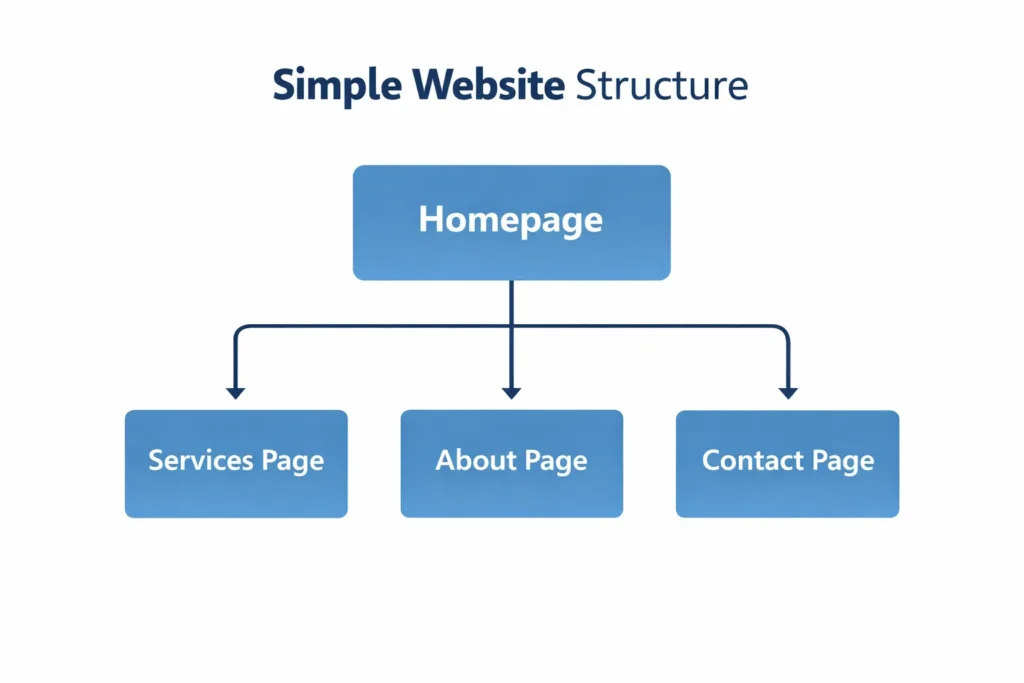
In reality, most successful websites begin much more simply. The first version might include only a homepage, a short description of services, and a contact page. That is enough for customers to understand the business and reach out.
From there, the site can grow gradually. Additional pages can explain services in greater detail. Articles can be added to answer customer questions. Images and testimonials can appear over time.
The WordPress.com AI Website Builder encourages this launch first approach. Because the starting structure appears quickly, business owners can focus on getting their site online rather than endlessly planning it. Once the site is live, improvements become easier. Real customers visit the pages. Real feedback appears.
The website evolves alongside the business.
Why More Small Businesses Are Taking This Approach
For many small businesses, the decision comes down to three practical benefits.
Speed:
Instead of waiting weeks for a freelancer schedule, the first version of the website can appear within minutes.
Control:
The business owner can update text, images, and pages whenever needed without depending on someone else.
Confidence:
The structure generated by the builder provides a professional starting point that can be refined over time.
These benefits explain why AI assisted website tools are becoming attractive to solopreneurs and microbusiness owners. They provide a path to a credible online presence without requiring a large budget or technical expertise.
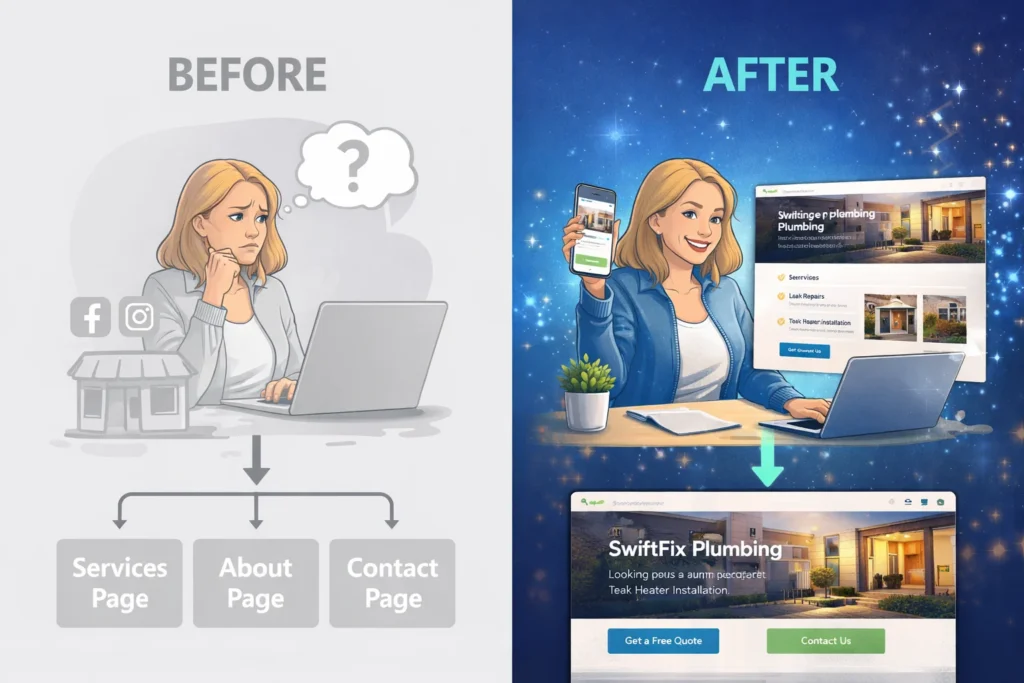
Small Business Case Study: Launching a Local Service Website Without Hiring a Freelancer
Rajesh runs a small home repair service in his city. For years he relied on referrals and messaging apps to get new customers. Most of his work came through word of mouth.
Eventually he realized something important. Customers were searching online before calling any service provider. When they looked for repair services in the area, businesses with websites appeared more credible than those without one.
Rajesh considered hiring a freelancer to build a website. After asking around, he discovered that even a simple project could take several weeks and require a significant budget. He also worried about something many small business owners experience.
What happens after the site is built?
If he wanted to update prices, add new services, or change photos, he would likely need to contact the same person again. That meant additional cost and delays.
Instead, Rajesh decided to try the WordPress.com AI Website Builder.
The process started with a simple description of his business. He explained that he ran a local repair service and needed a website with a homepage, a services section, and a contact page.
Within minutes the builder generated the first layout.
The homepage introduced the business and explained the services offered. Another section described the types of repairs he handled. A contact area made it easy for customers to send inquiries.
The result was not a finished website. But it was a real starting point. Rajesh replaced the example text with his own descriptions. He added photos from recent repair projects. He adjusted the wording so it sounded natural for his business.
Within a short time he had a website that looked professional and clearly explained what he offered. More importantly, he understood how to update it. When he later added a new service, he edited the page himself. When he wanted to update a photo, he replaced it inside the editor.
The website became something he could maintain without outside help. For many small businesses, this kind of experience is the real value of AI assisted builders. They provide a structured starting point while still allowing the owner to shape the final result.
A professional website appears faster, and the business keeps control going forward.
Quick Recap
• Small businesses often delay websites because hiring freelancers takes time and money.
• The WordPress.com AI Website Builder creates a structured site from a simple description.
• You can edit text, images, and layout yourself without depending on outside help.
Describe your site. Watch it build.
Skip the blank screen and start with a real website structure built on WordPress. Describe your business, see your pages appear, and refine the site as you go.
Start Building Your WordPress SiteFree to start. Choose a plan when you’re ready to go live.
🙏 Disclosure & Thank You
This post contains affiliate links to WordPress.com.
If you purchase through my links, I earn a small commission at no extra cost to you. Thank you for supporting us – DreamHosters
Trust-Building FAQ
Will my website look generic if it is created with AI?
This is a common concern. Many business owners assume an AI builder produces the same design for everyone. In practice, the starting layout is only a foundation. The WordPress.com AI Website Builder generates sections based on the description you provide and uses professionally designed WordPress block patterns to structure the page.
After the first version appears, you can adjust the text, replace images, change colors, and rearrange sections inside the editor. Over time the site reflects your business rather than a template. The AI helps you start faster, but the final look and message still come from you.
Is this just another AI gimmick builder?
No. The site is built directly inside WordPress.com infrastructure. That means the pages, layouts, and content are created using native WordPress blocks rather than disposable AI code. The result is a real WordPress website hosted and managed on WordPress.com.
This matters because WordPress is one of the most widely used publishing platforms in the world. Businesses rely on it for long-term websites that can evolve as their needs grow. The AI builder simply helps generate the starting structure.
What happens if my business grows later?
Growth is one of the reasons many small businesses choose WordPress. Because the website is built on WordPress from the beginning, it is not a temporary or isolated system. Pages can be expanded, new sections can be added, and the site can evolve as the business develops.
You are starting on a platform designed for long-term publishing rather than something that needs to be replaced later.
Do I need to manage hosting or security?
No. Hosting, security, and software updates are handled automatically on WordPress.com. This removes many of the technical responsibilities that usually come with running a website. Business owners can focus on their content and services instead of managing infrastructure.
Can I update my website myself after it launches?
Yes. This is one of the biggest advantages for small business owners.
The WordPress editor allows you to change text, replace images, and adjust page sections without technical knowledge. If you need help while editing, the WordPress AI Assistant can help refine text, suggest improvements, and guide you through changes directly inside the editor.
This means your website remains something you can control and update whenever your business needs to evolve.

