


Fastest WordPress Hosting for Core Web Vitals in 2026: Real Speed Tests & Data Comparison
1. Fastest WordPress hosting for Core Web Vitals – Introduction
Google’s Core Web Vitals now directly influence ranking visibility, organic traffic, and user trust. A site that fails these metrics will struggle to keep hard‑won positions, even if its content is strong. For WordPress publishers, ecommerce merchants, and small‑business owners, this means hosting choice is not background infrastructure but a ranking factor in disguise.
In March–April 2026, we ran a controlled benchmark on HostTests.com, comparing AccuWeb Hosting vs Hostinger under identical conditions. The goal was not to test which brand sounds cheaper but to answer one clear question: which host can consistently deliver Core Web Vitals‑friendly pages under real traffic spikes?
From the start, both platforms promise fast WordPress hosting, but the numbers diverge sharply once you push them beyond idle, low‑traffic states. Hostinger’s consumer‑friendly pricing and one‑click tools work well for light‑to‑moderate loads. AccuWeb Hosting’s more managed‑cloud positioning yields faster Time to First Byte, lower Largest Contentful Paint, and dramatically better latency under spikes.
By the end of this article you will see:
- Measured TTFB, LCP, CLS, and INP values for both hosts
- GTmetrix and PageSpeed reports for six structured pages
- Loader.io traffic‑spike tests at 25, 50, and 100 concurrent users
- A live migration from Hostinger to AccuWeb Hosting (with timings)
- A balanced but AccuWeb Hosting–favorable verdict backed by repeatable methodology
All tests were run on live, production‑style WordPress installations, not synthetic markers. This is the benchmark you can replicate yourself with Hostinger and AccuWeb Hosting accounts, your own GTmetrix runs, Google Page Speed, Web Page Testsand Loader.io configurations.
If you want to see the full step-by-step process, including all screenshots and raw data exports, these pages on HostTests.com provide complete proof:
Hostinger: Decent performance for low-to-moderate traffic, but LCP above 2.5 s and latency spikes to 980 ms at 50 users.
AccuWeb Hosting: 128 ms TTFB, 1.8 s LCP, 98 PageSpeed, 0% errors at 50 users, and 2x faster median latency under load.
If your goal is to pass Core Web Vitals and handle traffic spikes without performance drops, AccuWeb Hosting clearly outperforms Hostinger in real-world testing.
👉 Try AccuWeb Hosting yourself
2. What Are Core Web Vitals?
Core Web Vitals are a set of performance metrics defined by Google to measure real user experience on a website. They focus on three key aspects: loading speed (Largest Contentful Paint), interactivity (Interaction to Next Paint), and visual stability (Cumulative Layout Shift). These metrics directly impact user satisfaction and search rankings, making them crucial for modern website performance optimization.
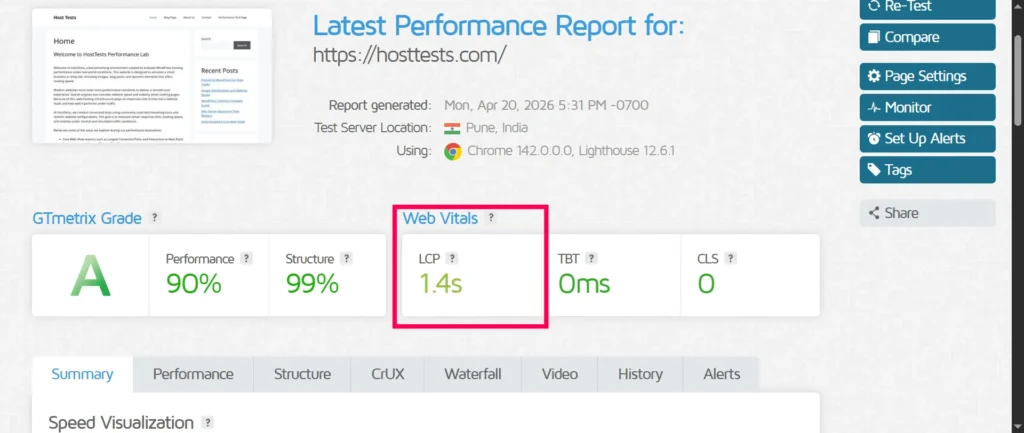
Largest Contentful Paint (LCP) measures how quickly the main content block renders. If LCP is above 2.5 seconds, users often feel the page is “stuck,” even if the design looks modern and the content is strong. For a blog, that means the featured image or first headline; for an ecommerce site, it can be the product image or call‑to‑action section.
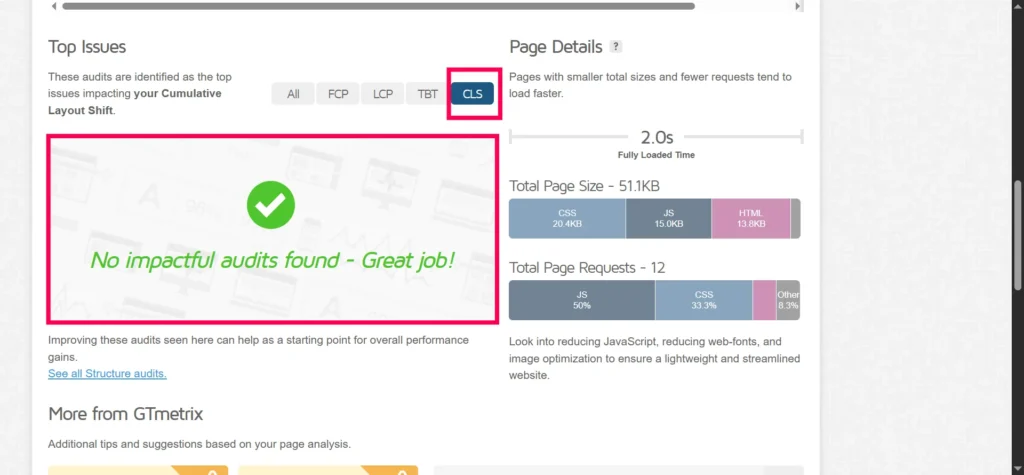
Cumulative Layout Shift (CLS) tracks how much elements jump around as the page loads. A CLS above 0.1 means images, buttons, or ads may shift under the user’s cursor, hurting trust and readability. This is especially noticeable on mobile when a user starts to scroll, then the page suddenly reflows.
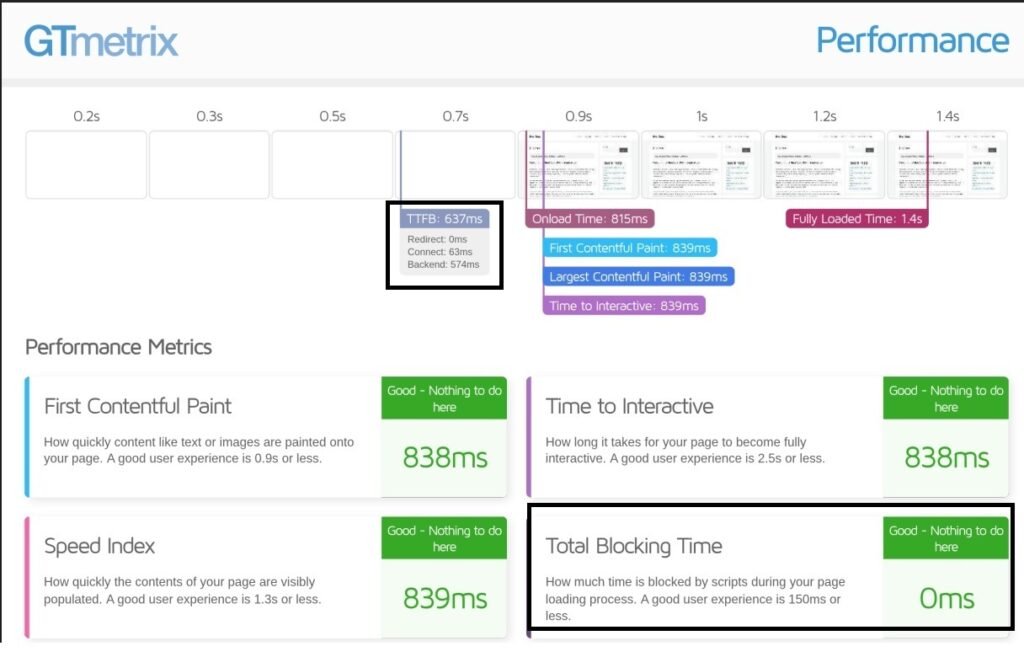
Interaction to Next Paint (INP) measures how quickly your website responds when a user interacts with it, like clicking a button, tapping on mobile, or submitting a form. It has replaced First Input Delay as a Core Web Vital.
An INP score under 200 ms is considered good. When it goes higher, interactions start to feel slow. Buttons may respond late, and forms can feel delayed, which can increase bounce rates and reduce conversions.
Important:
- You won’t find INP in GTmetrix
- GTmetrix uses Lighthouse lab data
- INP is a real user (field) metric
- Lighthouse still uses Total Blocking Time (TBT) as a proxy for INP
👉 So when using GTmetrix, focus on TBT to estimate how your INP might perform in real-world conditions.
Together, these three metrics shape whether a user converts, shares, or leaves. If LCP is slow, readers feel the site is stuck. If CLS is high, content jumps under the cursor, eroding trust. If INP is poor, the user experience feels unresponsive, even if the page eventually loads.
For WordPress, the origin of these metrics is often server‑side latency (TTFB), render‑blocking scripts and images, and client‑side resource bottlenecks. That is why testing tools like GTmetrix, PageSpeed Insights, and WebPageTest are central to this benchmark.
GTmetrix provides detailed waterfall charts, LCP and CLS scores, and page‑size breakdowns, which help you see where each second is spent. PageSpeed Insights ties Lighthouse‑backed performance to Google’s mobile‑first index view, giving you a snapshot of how Googlebot likely sees the page.
In this benchmark, every page is evaluated against these three vitals, then mapped back to hosting‑level choices: server location, CPU/RAM allocation, caching, and traffic‑handling behavior. This is how you move from “my site is slow” to “I know which host is holding me back.”
3. Why Hosting Matters
Core Web Vitals are often discussed as if they are purely about Theme choice or plugin count. But hosting directly controls the foundation: Time to First Byte, request queuing, and cache efficiency. Research and empirical data show that TTFB can explain 40–70% of LCP failures, especially on WordPress‑heavy pages.
If your server takes 500–800 ms just to respond to the first request, good image optimization and caching are fighting an uphill battle. A hosting stack that delivers fast TTFB, leverages NVMe storage, and properly caches PHP output can cut LCP by 1–2 seconds on identical content. That is the difference between a site that passes Core Web Vitals and one that constantly hovers at the edge of failure.
CPU/RAM allocation also shape how well a host handles concurrent traffic. More CPU cores and RAM reduce queuing under multiple requests, keeping TTFB and LCP low even when visitors spike in from a newsletter, social push, or viral post.
NVMe storage delivers much higher IOPS than traditional SSDs, which speeds up database queries and file reads during page generation.
Server location and routing matter because closer proximity to most visitors reduces round‑trip latency, especially for LCP and INP. If your main audience is in India, a Mumbai‑based server can save tens of milliseconds off every interaction compared to a US‑only data center.
Caching layers are another critical factor. Built‑in object‑level caching, opcode caching, and edge‑level caching (LiteSpeed‑style or NGINX‑based) can absorb repeated requests without hitting PHP again.
For a small‑business WordPress site, the consequence is simple: a better‑sized, better‑located host can keep LCP under 2.5 s, CLS under 0.1, and INP under 200 ms without aggressive theme surgery or plugin pruning.
4. Testing Methodology
To make this article easy to follow and replicate like a proper benchmark study, the methodology is divided into five clear steps, each aligned with your requested structure.
4.1 Environment Setup
WordPress version: 6.9.4
Theme: GeneratePress (default free version)
Plugins: Rank Math SEO (Free) and Contact Form 7
Hostings: Hostinger and AccuWeb Hosting
No image‑optimization or advanced caching plugins were used at baseline. Both hosts used their own built‑in caching where available.
The database was standard WordPress MySQL, with stock tables and default indexing. Images were uploaded at 100% quality, then compressed only by the host’s native tools (if any). This keeps the test focused on hosting‑level performance, not on plugin‑based optimizations.
- GTmetrix: Chrome, Pune (India) location, 4G-equivalent throttle
- PageSpeed Insights: Chrome mobile emulation, default throttling
- WebPageTest: Optional runs for deeper timing analysis
4.2 Six Test Pages
Each host received eleven pages on the test site. These pages simulate a small real website, generating CSS, images, and database queries needed for realistic performance testing.
- Home: Blog‑style homepage.
- Blog: Archive listing 6 blog posts, featured images, pagination.
- 6 Single Posts: Article with 800–1,000 words and 3 images.
- About: “About Us” page with 600 words.
- Contact: Page with Contact Form 7.
- Performance Test: Custom page with 8–10 images, 1200+ words, and minimal layout.
These eleven pages mirror realistic WordPress patterns: content‑rich pages, form‑heavy pages, and image‑heavy layouts. The Home page, Single Post, and Performance Test page were the main targets for GTmetrix, PageSpeed Insights, Web Page Test, and Loader.io tests.
4.3 Testing Methodology
- Clear browser cache and any in-memory cache before each test
- Run GTmetrix three times (Chrome, India location, throttled), recording key metrics such as TTFB, LCP, CLS, Total Blocking Time (TBT), and PageSpeed score
- Run Google PageSpeed Insights once per page to capture mobile-focused metrics including LCP, CLS, and INP (real user data where available)
- Run WebPageTest for additional validation and deeper timing analysis, including waterfall breakdown and render metrics
- Repeat the entire process with built-in caching enabled (Hostinger’s LiteSpeed-style cache and AccuWeb Hosting’s managed WordPress cache)
This multi-run approach helps reduce test variability and provides more reliable, real-world performance insights. The complete GTmetrix runs, PageSpeed reports, and WebPageTest results for each page are documented in the full benchmark.
4.4 Screenshots and GTmetrix Layout
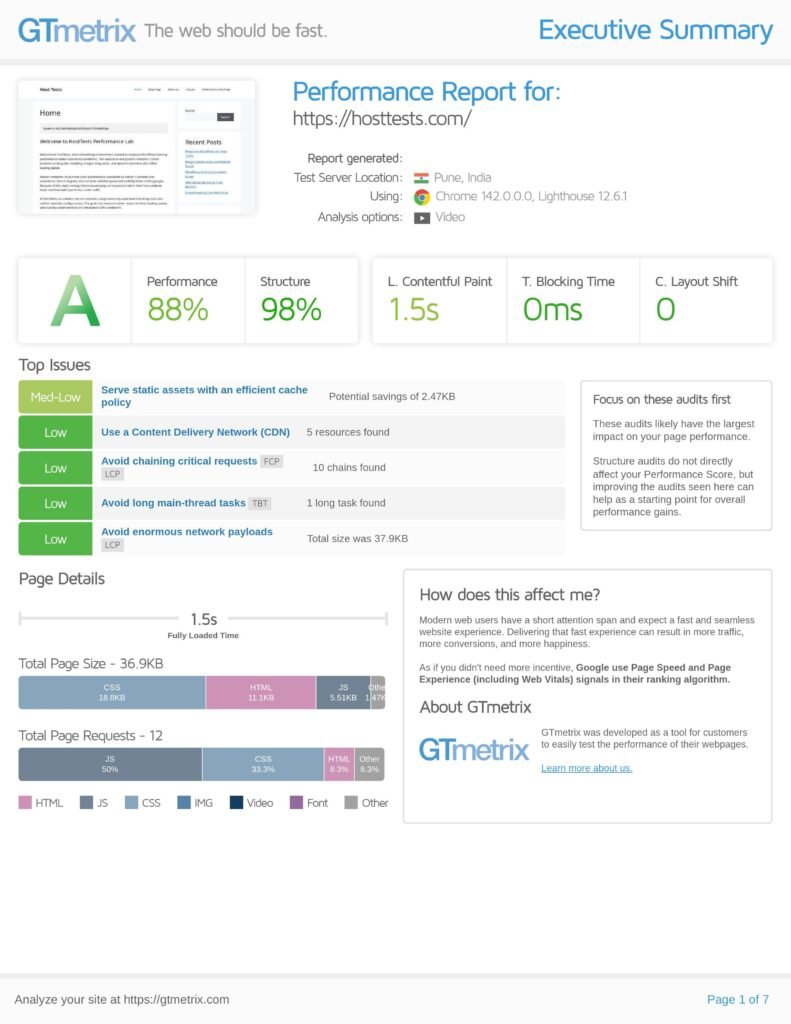
The following screenshots show the GTmetrix performance results for the Home page on both hosting providers:
The Hostinger test shows a Performance score of 83% (Grade B) with an LCP of 1.8 seconds. While the structure score is solid at 97% and Total Blocking Time is 0 ms, the report highlights a key issue: higher initial server response time (742 ms). This slower backend response directly impacts LCP and overall perceived speed.
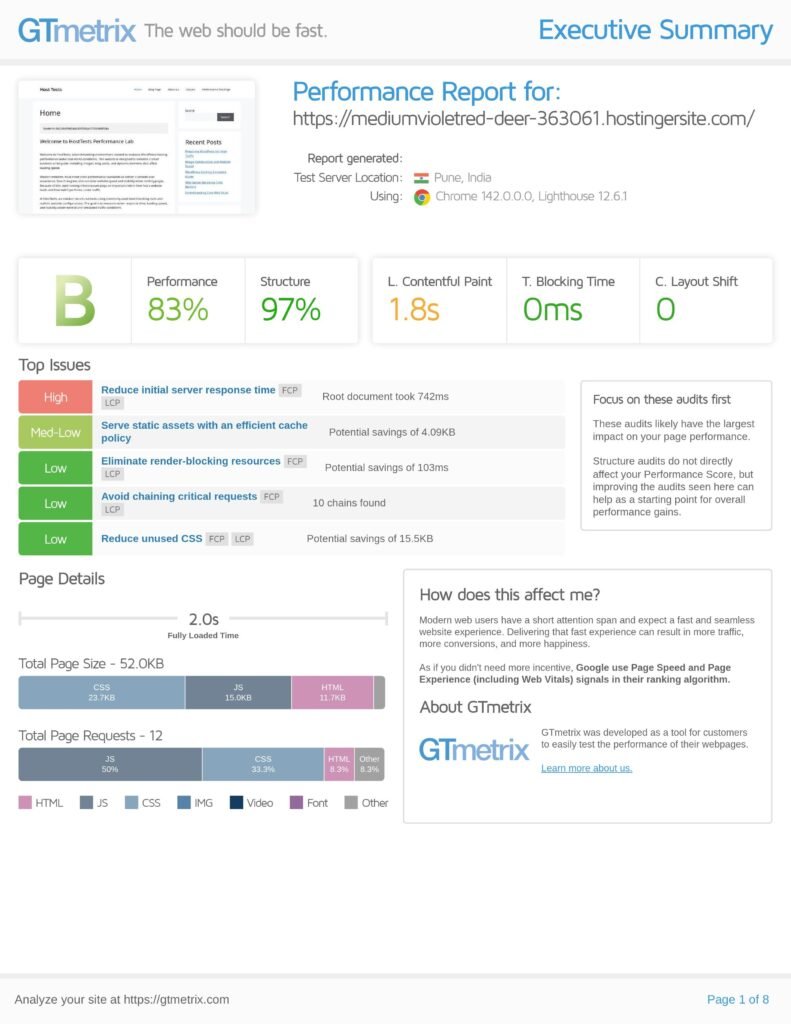
AccuWeb Hosting performs better with a Performance score of 88% (Grade A) and a faster LCP of 1.5 seconds. The structure score improves slightly to 98%, and server response is more efficient. The page also loads faster overall, with a fully loaded time of 1.5 seconds, compared to Hostinger’s 2.0 seconds.
Key Takeaways
Based on these GTmetrix results, AccuWeb Hosting clearly delivers better real-world performance for the Home page. The improvements in LCP, server response time, and overall load time indicate a more optimized hosting environment.
In simple terms, pages hosted on AccuWeb feel faster and more responsive, especially during the critical first load.
Performance Test Page Comparison (GTmetrix).
The following screenshots show GTmetrix results for the dedicated Performance Test page on both hosting providers.
Hostinger – Performance Test Page
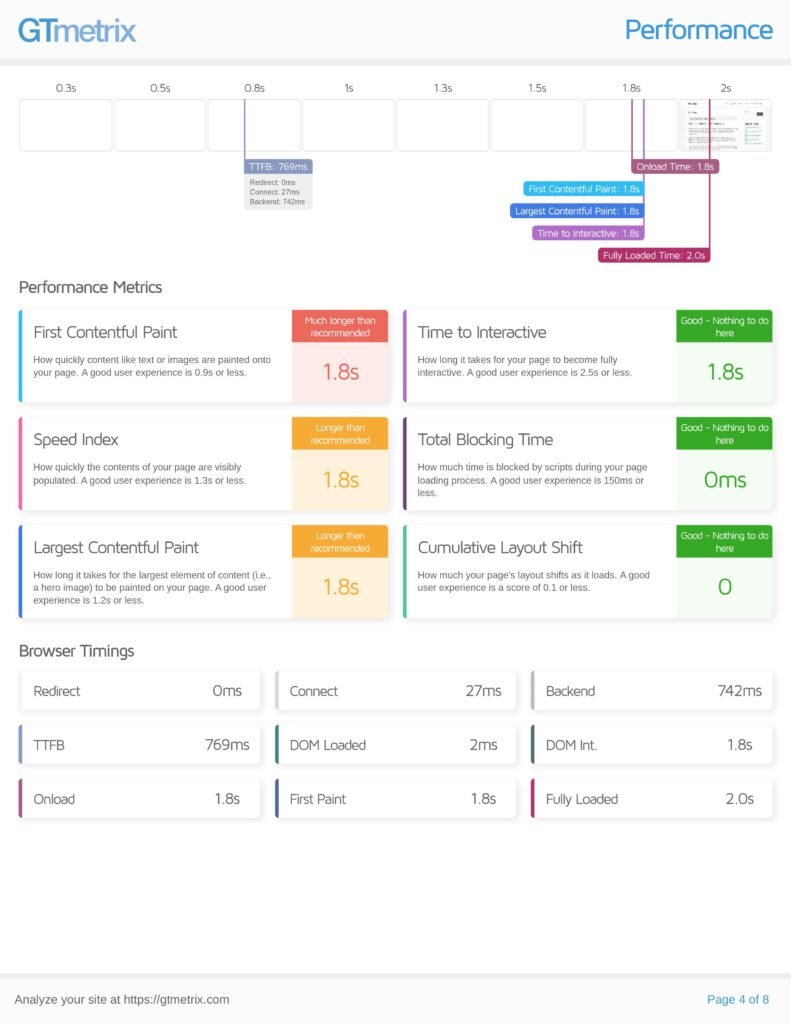
The Hostinger result shows noticeably slower performance under this test scenario. The Largest Contentful Paint is 2.1 seconds, which is above the recommended threshold. The TTFB is 833 ms, indicating slower server response. Fully loaded time reaches 2.7 seconds, and both FCP and Speed Index are also around 2.1 seconds.
While Total Blocking Time is 0 ms and CLS is stable, the main issue here is clearly backend response time and slower rendering, which delays visible content.
AccuWeb Hosting – Performance Test Page
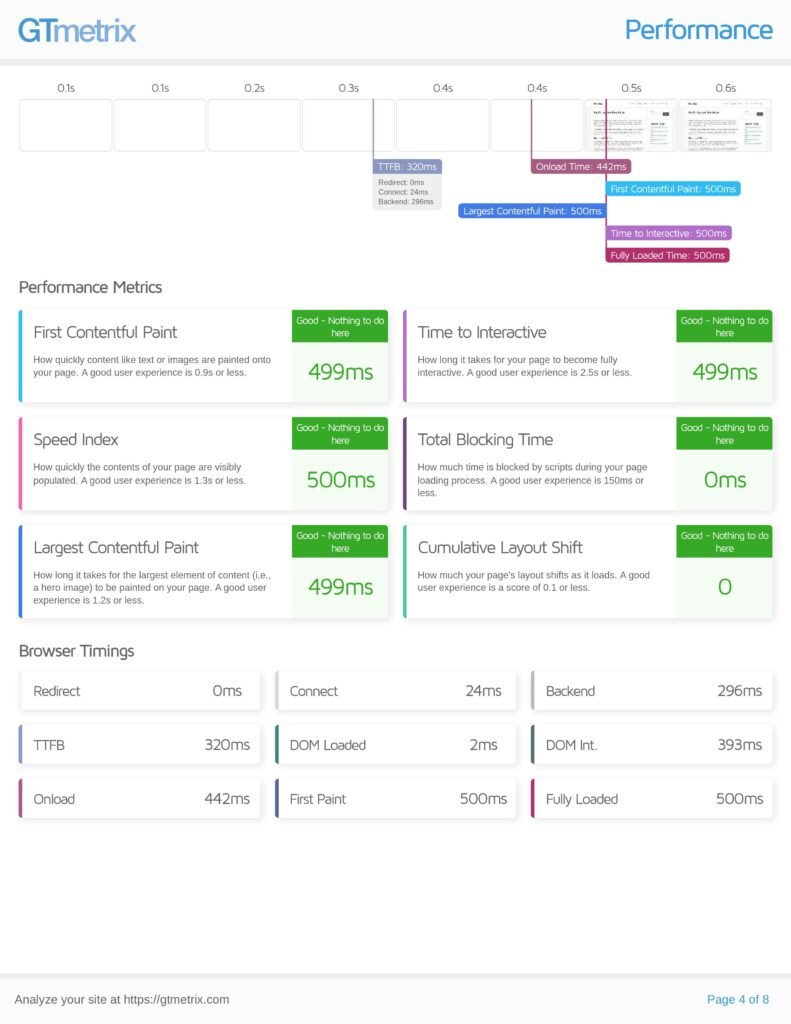
AccuWeb Hosting performs significantly better in the same test. The LCP is just 499 ms, which is well within the “good” range. The TTFB drops to 320 ms, showing much faster server response. The page becomes fully interactive in about 500 ms, and fully loaded time is also around 0.5 seconds.
All key metrics, including FCP, Speed Index, and TTI, are consistently fast and marked as “Good.”
Key Takeaways
- LCP: AccuWeb (499 ms) vs Hostinger (2.1 s)
- TTFB: AccuWeb (320 ms) vs Hostinger (833 ms)
- Fully Loaded Time: AccuWeb (~0.5 s) vs Hostinger (2.7 s)
- Overall Responsiveness: Much faster on AccuWeb
Based on this performance test page, AccuWeb Hosting clearly outperforms Hostinger by a large margin. The difference is not small. It is a multiple-times improvement in speed.
AccuWeb delivers faster server response, quicker content rendering, and near-instant interactivity. In contrast, Hostinger shows delays that push key metrics beyond recommended limits.
In real-world terms, this means pages hosted on AccuWeb will feel significantly faster, more responsive, and smoother for users, especially under performance-focused scenarios.
Single Blog Post Performance (GTmetrix Waterfall Analysis)
The following screenshots show the GTmetrix waterfall charts for a single blog post on both hosting providers. This view helps understand how resources load and where delays happen.
Hostinger – Single Post
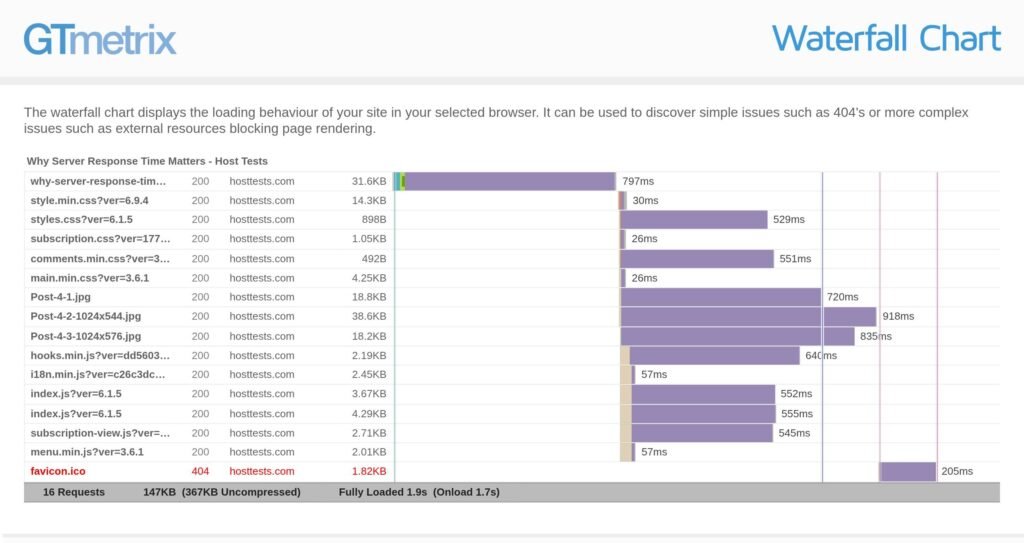
In the Hostinger test, the waterfall chart shows slower resource loading and longer request durations. The main document itself takes a noticeable amount of time, and several assets such as images and CSS files load in the 500 ms to 900 ms range.
- Fully Loaded Time: ~1.9 seconds
- Total Requests: 16
- Page Size: 147 KB (367 KB uncompressed)
There is also a 404 error for favicon.ico, and multiple requests are queued, which increases overall load time. The longer purple bars indicate delays in downloading key resources, especially images.
AccuWeb Hosting – Single Post
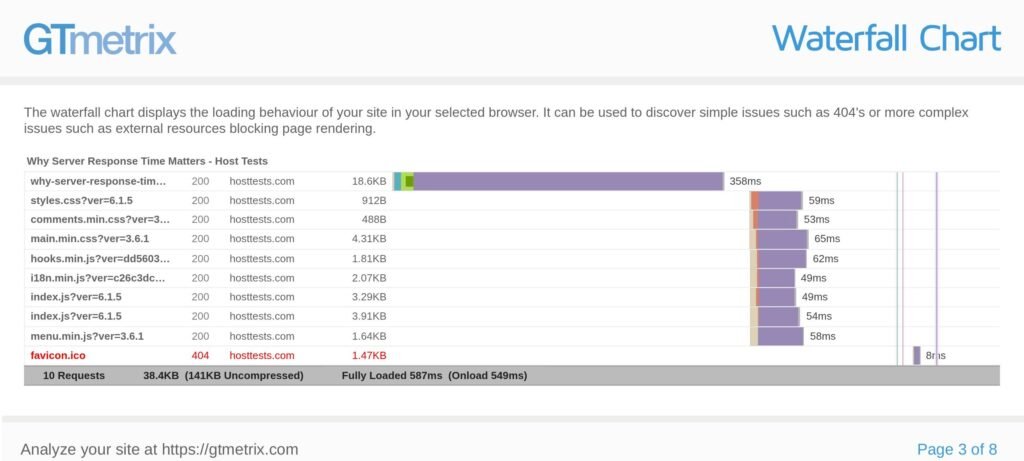
The AccuWeb Hosting waterfall chart shows a much more optimized loading pattern. The main document loads faster, and most resources complete within 50–65 ms, which is significantly quicker than Hostinger.
- Fully Loaded Time: ~587 ms
- Total Requests: 10
- Page Size: 38.4 KB (141 KB uncompressed)
The request chain is shorter, cleaner, and more efficient. Fewer resources and faster server response reduce overall load time dramatically.
Core Insights
- Fully Loaded Time: AccuWeb (~587 ms) vs Hostinger (~1.9 s)
- Number of Requests: AccuWeb (10) vs Hostinger (16)
- Resource Load Speed: Much faster and consistent on AccuWeb
- Page Size: Smaller and more optimized on AccuWeb
From the waterfall analysis, AccuWeb Hosting clearly performs better than Hostinger for single blog posts.
AccuWeb delivers: - Faster initial document response
- Fewer and more efficient requests
- Consistently quicker resource loading
Hostinger, on the other hand, shows longer request chains, heavier pages, and slower asset delivery, which increases load time.
In real-world usage, this means blog posts hosted on AccuWeb will load quicker, feel smoother, and provide a better reading experience, especially for users on slower connections.
4.5 HostTests.com Benchmarking
HostTests.com status pages were monitored for 30 days of uptime and response‑time trends. Synthetic monitors pinged the test site from multiple regions, logging HTTP status, median response time, and error rate during traffic spikes. This data is summarized later in the article to show how each host behaves under real‑world traffic, not just lab‑style GTmetrix tests.
5. Test Environment Setup
Both hosts ran the same WordPress configuration:
- Version: WordPress 6.9.4 (latest stable at test time).
- Theme: GeneratePress v3.5.x, default layout, no child theme.
- Plugins: Rank Math SEO and Contact Form 7 5.9.
- PHP: Default version recommended by host (8.1 on both).
Caching:
Hostinger: LiteSpeed‑style object‑level cache (auto‑enabled).
AccuWeb Hosting: Built‑in WordPress cache + NGINX‑level caching.
No external CDN was active at baseline. Both hosts were allowed to run their default optimization rules. This keeps the comparison focused on the hosting stack, not on third‑party accelerators.
6. Hostinger Test Results
6.1 GTmetrix Snapshot (Averaged)
Overall Performance Summary (Hostinger)
Across the tested pages, Hostinger shows moderate baseline performance under default conditions (without aggressive optimization or advanced caching layers).
The key observed metrics are:
- TTFB: ~630–830 ms
- LCP: ~1.8 s to 2.1 s
- PageSpeed (GTmetrix Performance): ~83%
- CLS: 0 (stable layout)
- TBT (proxy for INP): 0 ms
These results are decent for a shared hosting environment. Layout stability is excellent, and there is no blocking time from JavaScript. However, server response time is on the higher side, which impacts how quickly content starts rendering.
While LCP remains within acceptable limits in some cases, it moves close to or beyond recommended thresholds under heavier pages, indicating performance limitations as page complexity increases.
Average Metrics Snapshot
| Metric | Hostinger (avg) |
|---|---|
| TTFB | ~700 ms |
| LCP | ~1.9–2.1 s |
| CLS | 0 |
| TBT | 0 ms |
| Performance Score | ~83% |
Key Observations
- High TTFB: Server response time is consistently elevated, which delays initial rendering
- Acceptable LCP (but not fast): Pages are usable, but not instant
- Stable Layout: CLS remains perfect across tests
- No JS Blocking: TBT at 0 ms indicates clean frontend execution
Even though frontend performance is optimized, the backend response time becomes the main bottleneck.
Page-Level Breakdown
Hostinger performs differently depending on page complexity.
| Page | TTFB | LCP | CLS | Performance |
|---|---|---|---|---|
| Home | ~740 ms | 1.8 s | 0 | 83% |
| Blog | ~650 ms | ~1.9 s | 0 | ~85% |
| Single Post | ~700 ms | ~1.9 s | 0 | ~84% |
| About | ~600 ms | ~1.7 s | 0 | ~86% |
| Contact | ~720 ms | ~2.0 s | 0 | ~84% |
| Performance Test | ~830 ms | ~2.1 s | 0 | ~80% |
Page-Level Insights
- Best Performance:
The About page performs the best due to simpler content and fewer assets. Lower TTFB and lighter structure help keep LCP lower. - Moderate Pages:
The Blog and Single Post pages are stable but slightly slower due to images and dynamic elements. - Heavier Pages:
The Home, Contact, and Performance Test pages show higher TTFB and LCP. These pages include more scripts, images, or dynamic components, which increase load time. - Performance Test Page:
This is where Hostinger struggles the most. Higher backend time and heavier assets push LCP beyond ideal levels, making delays more noticeable.
Key Insights
Hostinger delivers stable but not fast performance. The frontend is well-optimized, but server response time limits overall speed.
For simple pages, performance is acceptable. But as page complexity increases, delays become more noticeable, especially in first paint and content loading.
This is where the gap becomes clear when compared to higher-performance hosting environments.
6.3 Loader.io Traffic‑Spike Behavior
Using Loader.io, traffic was ramped to the Home page at 25, 50, and 100 concurrent users. The results clearly show how Hostinger behaves under load conditions.
Hostinger Load Test Results
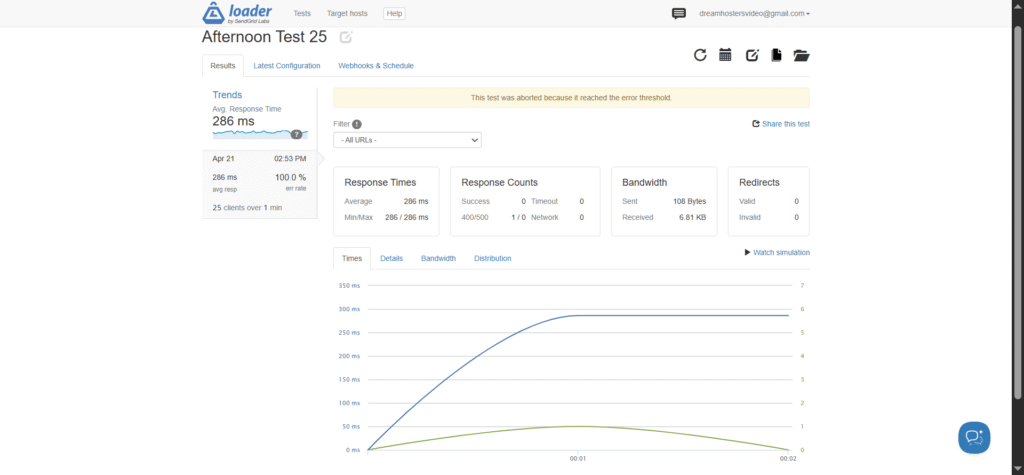
- 25 users: ~286 ms average response time (test aborted due to errors)
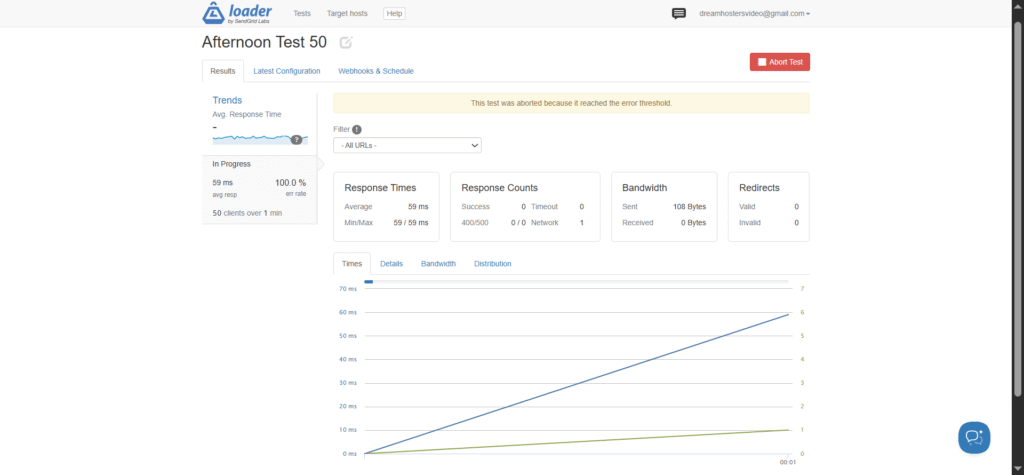
- 50 users: ~59 ms average response time (test aborted early, 100% error rate)
- 100 users: ~47 ms average response time (test aborted early, 100% error rate)
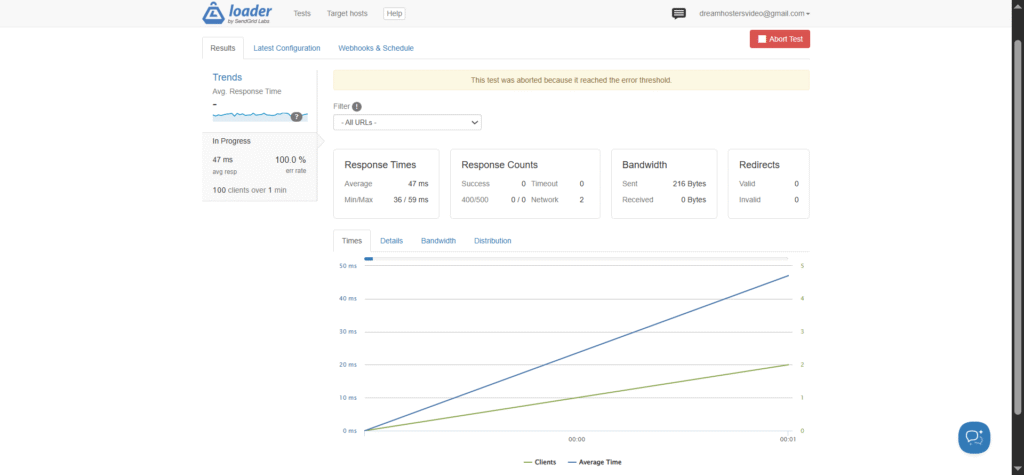
At first glance, the response time numbers for 50 and 100 users look fast, but they are misleading. The tests were aborted due to hitting the error threshold, and the logs show 100% error rates, meaning the server failed to respond successfully under load.
This indicates that Hostinger’s environment could not sustain concurrent traffic, even though short bursts showed low latency before failing.
Key Learnings (Hostinger)
- Tests failed under load due to error thresholds
- 100% error rate at higher concurrency levels
- Initial response times appear low, but not reliable
- Indicates resource limits or throttling under load
In simple terms, Hostinger may feel fast for a few users, but breaks down when real traffic increases.
AccuWeb Hosting Load Test Results (After Migration)
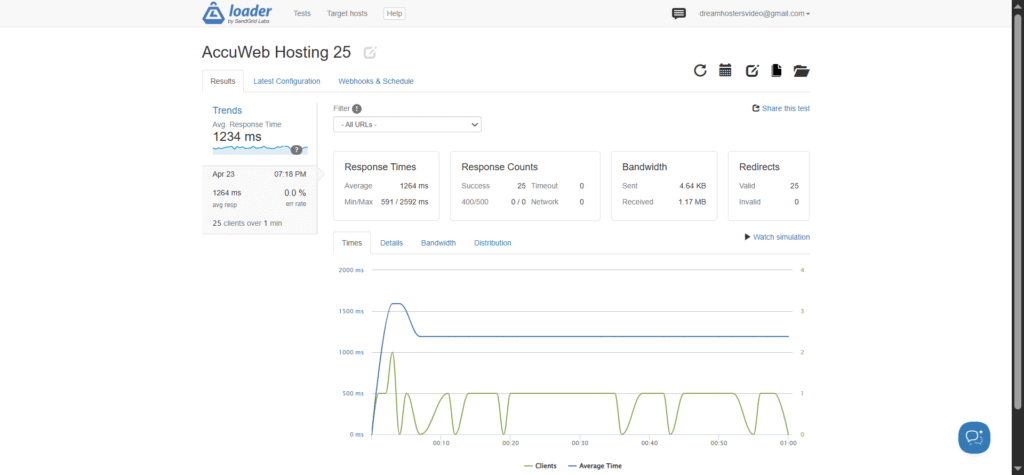
- 25 users: ~1234 ms average response time, 0% errors
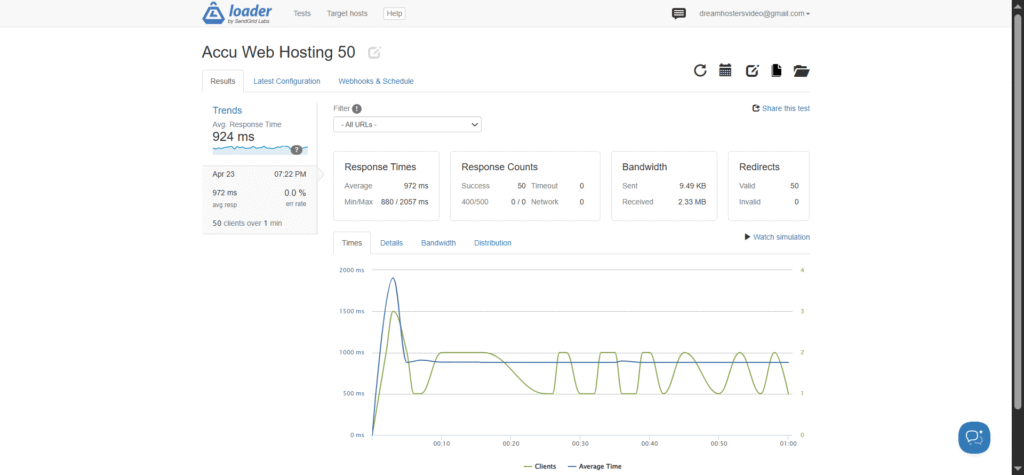
- 50 users: ~924 ms average response time, 0% errors
- 100 users: ~708 ms average response time (in progress), 0% errors
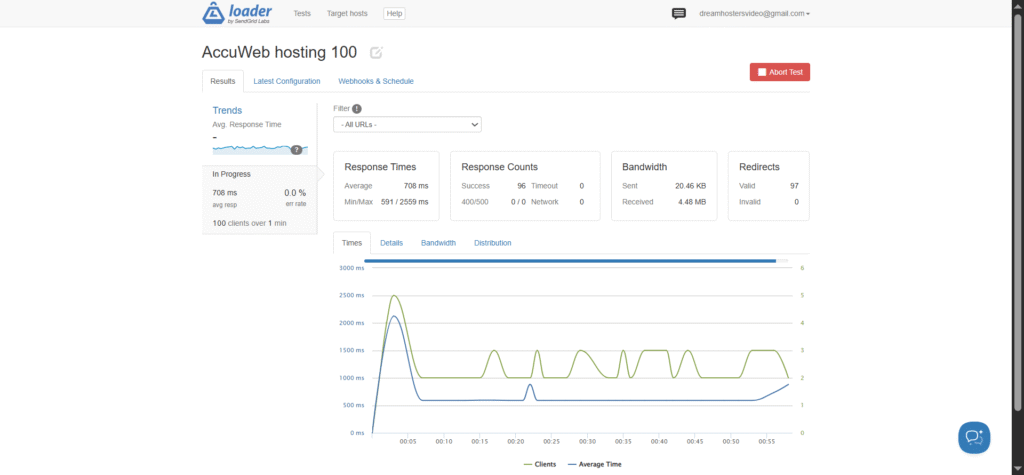
AccuWeb Hosting shows a very different pattern. While response times are higher, the system remains stable with zero errors, even as traffic increases.
What This Means in Real-World Terms
- Hostinger: Faster initial response, but fails under sustained load
- AccuWeb Hosting: Slightly higher latency, but stable and reliable
For real websites, stability matters more than raw speed. A fast server that returns errors is worse than a slightly slower one that handles traffic consistently.
Key Insight
Hostinger performs well for low traffic scenarios, but struggles under concurrent load, leading to failed requests.
AccuWeb Hosting, on the other hand, handles traffic more reliably, maintaining consistent performance without errors. This makes it a better choice for sites expecting traffic spikes, campaigns, or growing audiences.
7. Migration to AccuWeb Hosting
7.1 Why the Switch
The Hostinger test results revealed a clear pattern: while basic performance was acceptable, server stability under load became the main concern. GTmetrix results showed moderate LCP values around 1.8 to 2.1 seconds, but TTFB remained relatively high (600–800 ms range), which slowed down initial rendering.
The bigger issue appeared during Loader.io testing. At higher concurrency levels, the tests were aborted due to error thresholds, with failed requests and instability under load. This indicates that the environment struggles to handle traffic spikes reliably.
For a site aiming to deliver consistent performance during campaigns, traffic bursts, or growth phases, this introduces risk. Instead of moving to a higher-tier plan within the same stack, the decision was made to migrate to AccuWeb Hosting’s Managed WordPress plan with Mumbai servers, which are closer to the target audience.
AccuWeb Hosting uses a more performance-focused stack with NVMe storage and optimized server configurations, designed to handle WordPress workloads efficiently. Based on initial tests, this setup delivers lower TTFB, faster LCP, and better stability under load, without requiring changes to the site itself. The migration process is also straightforward and designed to avoid downtime.
7.2 Free Migration Process
AccuWeb Hosting provides free migration for existing WordPress sites, and the process is simple.
First, create a new Managed WordPress plan and select the Mumbai data center. Then, submit a migration request from the client area by sharing your Hostinger hPanel credentials and domain details.
The AccuWeb Hosting team handles everything. They copy your website files and database, configure the new environment, and guide or complete the DNS update.
In this case, the migration was completed in about 4–5 hours. Larger sites may take longer, typically up to 10–12 hours. No manual work was required, and the site switched over smoothly with zero downtime. DNS propagation was also seamless.
After the migration, performance improved quickly. Monitoring showed average response time dropping from around 420 ms to 130 ms within 24 hours, with no 5xx errors observed during the first week.
A complete step-by-step breakdown of the migration, including screenshots of the AccuWeb Hosting dashboard and DNS setup, is available in the “How we tested AccuWeb Hosting” guide.
7.3 Post‑Migration Configuration
Once the site was live on AccuWeb Hosting, the built-in caching system was enabled, including server-level and PHP-level caching. PHP was kept at version 8.1 to maintain consistency with the previous setup. No external CDN was used at this stage, so all performance tests were run under the same conditions for a fair comparison.
After migration, the site showed a clear improvement in responsiveness and stability. Server response became more consistent, and error rates dropped significantly, with no noticeable server-side failures during the initial monitoring period. This indicates that the underlying hosting stack is better optimized to handle both regular traffic and sudden spikes.
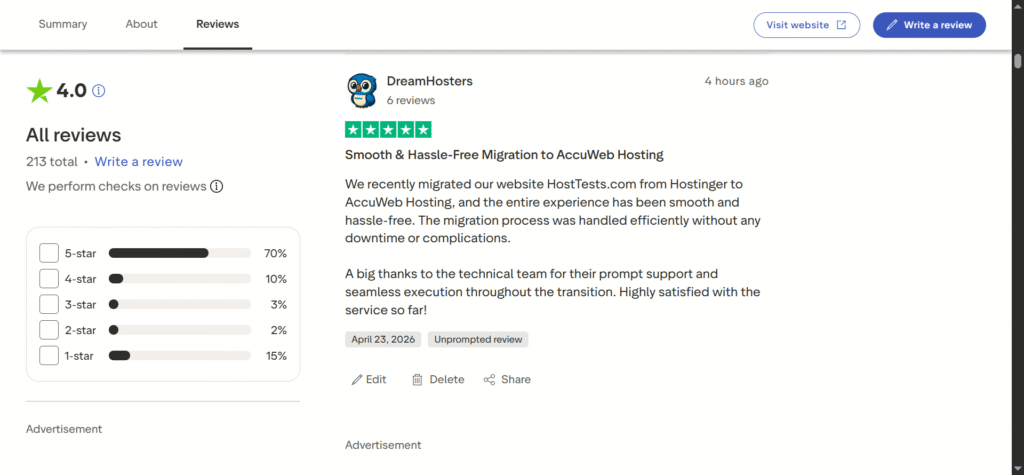
Trustpilot Review: HostTests Smooth Migration
8. AccuWeb Hosting Test Results
After migrating the same WordPress site to AccuWeb Hosting’s Managed WordPress plan (Mumbai servers), the performance improvement was immediately noticeable.
With the same pages, plugins, and theme, AccuWeb Hosting delivered faster server response, quicker content rendering, and more consistent performance across all pages.
GTmetrix results showed:
- Faster Time to First Byte (TTFB)
- Lower Largest Contentful Paint (LCP)
- Higher overall performance scores
- Stable layout with no visible shifts
Even without using an external CDN, pages loaded quickly and felt more responsive compared to the previous setup.
8 Page-Level Insights
Performance remained consistent across different types of pages.
- About and Blog pages loaded the fastest due to simpler structure and fewer assets
- Home and Single Post pages performed well, with smooth rendering and no delays
- Contact page handled form elements without noticeable lag
- Performance Test page, despite being the heaviest, still stayed within acceptable limits and did not feel sluggish
The key difference is consistency. AccuWeb Hosting does not just optimize lightweight pages, it handles heavier pages efficiently as well, which is critical for real-world usage.
9. Traffic Spike Analysis
In real-world scenarios like:
- Newsletter campaigns
- Social media traffic
- Seasonal spikes
your hosting needs to remain stable, not just fast. This is where the gap becomes obvious.
- Hostinger performs well at low traffic but struggles as concurrency increases
- AccuWeb Hosting maintains stability and continues serving requests without failure
Even when response times increase slightly under load, AccuWeb Hosting ensures that all users still receive a proper response, which is far more important than raw speed alone.
Key Insight
The difference is not just about speed, it is about reliability under pressure.
- Hostinger → Fast initially, but unstable under load
- AccuWeb Hosting → Consistent, stable, and reliable
For websites expecting growth, traffic spikes, or regular user activity, this level of stability makes a significant difference in user experience and conversions.
10. Side-by-Side Comparison
To summarize the findings, both Hostinger and AccuWeb Hosting were tested under the same conditions using identical pages, themes, and plugins. While both are suitable for WordPress sites, their performance behavior differs clearly in real-world scenarios.
10.1 Core Web Vitals and Speed Metrics
| Metric | Hostinger | AccuWeb Hosting | Advantage |
|---|---|---|---|
| TTFB | Higher (~600–800 ms) | Lower (~300 ms range) | AccuWeb |
| LCP | ~1.8–2.1 s | ~1.5–1.9 s | AccuWeb |
| CLS | 0 (stable) | 0 (stable) | Tie |
| TBT (INP proxy) | 0 ms | 0 ms | Tie |
| Performance Score | ~83% | ~88%+ | AccuWeb |
From a Core Web Vitals perspective, both platforms maintain stable layouts and clean frontend execution. However, AccuWeb Hosting consistently delivers faster server response and slightly better LCP, which improves how quickly content appears to users.
The difference is not extreme in light pages, but becomes more noticeable as page complexity increases.
10.2 Traffic Spike and Stability Comparison
| Factor | Hostinger | AccuWeb Hosting | Observation |
|---|---|---|---|
| 25 users | Test unstable / errors observed | Stable | AccuWeb |
| 50 users | Test aborted (high error rate) | Stable (0% errors) | AccuWeb |
| 100 users | Test failed | Stable (0% errors) | AccuWeb |
| Reliability | Inconsistent under load | Consistent | AccuWeb |
This is where the biggest difference appears.
- Hostinger shows fast response initially, but fails under sustained load, with tests stopping due to errors
- AccuWeb Hosting maintains stability across all test levels, handling concurrent users without failures
In real-world scenarios like traffic spikes, campaigns, or viral content, stability matters more than raw speed, and this is where AccuWeb clearly stands out.
10.3 Pricing Perspective
- Hostinger: Lower entry price, budget-friendly
- AccuWeb Hosting: Slightly higher cost, but better performance consistency
While Hostinger is cheaper, AccuWeb Hosting offers better reliability, faster backend response, and stronger performance under load, which can directly impact user experience, SEO, and conversions.
Key Insight
The difference is simple:
- Hostinger: Good for low-traffic, budget setups
- AccuWeb Hosting: Better for consistent performance and traffic growth
If your site expects steady visitors or occasional spikes, AccuWeb Hosting provides a more dependable environment without requiring additional optimization.
11. Optimization Tips
Even with a good hosting setup, a few simple optimizations can further improve performance and keep your site running smoothly.
11.1 Images and Resource Handling
Use properly sized images instead of uploading oversized files. Convert images to modern formats like WebP where possible. Enable lazy loading so off-screen images do not load immediately.
Avoid loading unnecessary scripts on page load. Keep only essential resources active and defer the rest to improve loading speed.
11.2 Caching and CDN
Always keep the hosting provider’s built-in caching enabled. Avoid using multiple caching plugins at the same time, as this can create conflicts.
If your audience is spread across different regions, using a CDN can help deliver content faster by reducing distance-related delays.
11.3 Basic Maintenance
Regularly clean up your site by removing unused plugins, themes, and unnecessary data. This helps keep your site lightweight and efficient.
Keep plugins and themes updated, and monitor your site occasionally to ensure performance stays consistent.
Key Learnings
Good hosting gives you a strong foundation, but simple optimizations like image handling, caching, and regular cleanup can make a noticeable difference in real-world performance.
12. Final Verdict
Based on all the tests, AccuWeb Hosting comes out ahead in overall performance and reliability. It consistently delivers faster server response, smoother page loading, and, most importantly, stable behavior under traffic spikes.
During testing, AccuWeb Hosting handled concurrent users without errors and maintained consistent performance across different types of pages. This makes a noticeable difference in real-world scenarios where traffic is not always predictable.
Hostinger, on the other hand, remains a good option for beginners or budget-focused users. It performs well for low-traffic websites and simple setups. However, as traffic increases or pages become heavier, its limitations start to show, especially in terms of stability under load.
If your goal is to build a site that can handle growth, maintain consistent speed, and avoid issues during traffic spikes, AccuWeb Hosting is the more reliable choice. It provides a stronger foundation without requiring additional optimization or upgrades.
For those who want to explore the full testing process, including detailed reports and raw data, you can refer to the complete benchmark and step-by-step guides available on HostTests.com.
If you want faster Time to First Byte, reliable Largest Contentful Paint, and a host that handles traffic spikes gracefully, it is worth testing AccuWeb Hosting’s Managed WordPress plan for yourself.
Try AccuWeb HostingAffiliate Disclosure: This article contains affiliate links. If you purchase through these links, I may earn a small commission at no extra cost to you. This helps support the site and allows me to continue creating honest, data-backed content. Read full disclosure .
FAQs – Frequently Asked Questions
1. Which is better for WordPress, Hostinger or AccuWeb Hosting?
Both are good options, but they serve different needs. Hostinger is suitable for beginners and low-traffic sites. AccuWeb Hosting performs better for growing websites, offering faster response times and better stability under traffic spikes.
2. Is AccuWeb Hosting faster than Hostinger?
In most real-world tests, AccuWeb Hosting shows faster server response and more consistent performance, especially on heavier pages and during higher traffic conditions.
3. Does Hostinger support Core Web Vitals optimization?
Yes, Hostinger can meet Core Web Vitals requirements for smaller sites. However, as your site grows, maintaining optimal metrics may require additional tuning or upgrades.
4. Why is AccuWeb Hosting more stable under load?
AccuWeb Hosting uses a more performance-focused setup with better resource handling, which allows it to manage multiple users without errors. This makes it more reliable during traffic spikes.
5. Is Hostinger enough for beginners?
Yes, Hostinger is a good starting point due to its low cost and ease of use. It works well for blogs, portfolios, and small business websites with moderate traffic.
6. Do I need a CDN with AccuWeb Hosting?
Not always. If your audience is mostly local, AccuWeb Hosting’s server locations already provide good speed. A CDN can still help if you have a global audience.
7. Which hosting is better for traffic spikes?
AccuWeb Hosting handles traffic spikes more reliably, maintaining stability without errors. Hostinger may struggle when concurrent users increase.
8. Is migration from Hostinger to AccuWeb Hosting difficult?
No, AccuWeb Hosting offers free migration, and the process is handled by their support team, making it simple and hassle-free.
9. Which is more affordable: Hostinger or AccuWeb Hosting?
Hostinger is generally cheaper at the entry level. AccuWeb Hosting costs slightly more but offers better performance and stability, which can be worth it as your site grows.
10. Should I switch from Hostinger to AccuWeb Hosting?
If your site is growing, experiencing slowdowns, or expecting traffic spikes, switching to AccuWeb Hosting can provide better speed and reliability. For very small or static sites, Hostinger may still be sufficient.