

WordPress.com vs Wix in 2026: I Built Sites on Both to See Which Is Better
TL;DR
Don’t have time to read the full comparison? Here’s the short version:
Choose WordPress.com if you want a website that can grow with your business, blog, or brand. It offers stronger content management, better long-term SEO potential, greater customization options, and the flexibility to expand your site as your needs evolve.
Choose Wix if your main priority is getting a simple website online as quickly as possible with minimal setup.
My Recommendation: For bloggers, content creators, affiliate marketers, small businesses, and anyone focused on long-term growth, WordPress.com is the clear winner in 2026. It provides a more powerful foundation that helps you build, scale, and optimize your website over time.
👉 Ready to get started? Launch your website with WordPress.com today
Introduction
In 2026, choosing a website builder is no longer about whether it can create a website. Almost every modern platform can do that. The real question is which platform can support your goals as your website grows. To find out, I built similar websites on both WordPress.com and Wix and compared them based on real-world usage rather than marketing claims.
Both platforms make it easy to get online quickly, but they take very different approaches. Wix focuses on simplicity and visual website building, while WordPress.com combines managed hosting with the power of the broader WordPress ecosystem. This comparison examines the areas that matter most, including setup, design flexibility, blogging, SEO, performance, eCommerce, and long-term growth potential.
Table of Contents
1. What I Tested
2. First Impressions
3. Setup Experience
4. Design and Editing
5. Quick Comparison Table
6. Blogging and Content Management
7. Ease of Use and Design Flexibility
8. Theme and Plugin Ecosystem
9. SEO Capabilities
10. Scalability and Long-Term Growth
11. Monetization Opportunities
12. E-commerce Functionality
13. Maintenance and Technical Burden
14. Overall Value and Long-Term Investment
15. Final Verdict
What I Tested
To keep the comparison fair, I created two similar websites using the same basic structure, content style, and goals. This allowed me to evaluate how each platform performs for someone starting from scratch and planning to build a real website rather than simply experimenting with features.
The evaluation focused on factors that matter most to bloggers, content creators, businesses, and online entrepreneurs:
- Setup and onboarding experience
- Ease of use and design flexibility
- Blogging and content management
- SEO capabilities
- Performance and reliability
- eCommerce functionality
- Scalability and long-term growth
First Impressions
Wix makes a strong first impression with its beginner-friendly onboarding and drag-and-drop editor. The interface is intuitive, and most users can start building pages immediately without consulting tutorials or documentation. For users who want quick results and complete visual control, Wix feels approachable from the very beginning.
WordPress.com takes a slightly different approach. While still beginner-friendly, it emphasizes content management, structured publishing, and long-term flexibility. Rather than focusing solely on visual editing, it provides a foundation designed to support blogging, SEO, business growth, and website expansion. For users planning to build a serious online presence, this broader approach becomes increasingly valuable over time.
Setup Experience
Wix is designed to simplify the website creation process. Templates, guided setup tools, and an intuitive editor help users launch websites quickly with minimal technical decisions. Everything from hosting to security is managed behind the scenes, making the platform particularly appealing to beginners.
WordPress.com also offers a streamlined setup experience while providing a stronger foundation for future growth. Hosting, security, and maintenance are included, but users also gain access to the powerful WordPress publishing ecosystem. As a result, WordPress.com delivers the convenience of a hosted website builder while offering significantly more room for expansion as website needs evolve.
Design and Editing
Wix excels at visual website design. Its drag-and-drop editor allows users to place elements almost anywhere on a page, making it easy to create attractive layouts with minimal effort. This design-first approach is ideal for users who prioritize visual customization and quick website creation.
WordPress.com uses a block-based editing system that emphasizes consistency, structure, and scalability. While it may feel more structured initially, it becomes increasingly beneficial as websites grow. The system makes it easier to maintain a professional design across multiple pages and manage content efficiently. For content-driven websites and growing businesses, this approach often proves more sustainable in the long run.
WordPress.com vs Wix: Which Platform Gives You More Room to Grow?
| Aspect | WordPress.com | Wix |
|---|---|---|
| Ease of use | Strong learning curve at first, but far more rewarding as your site grows | Easier to start, but can feel limiting once your needs become more advanced |
| Blogging | Built for serious publishing, content strategy, and editorial workflows | Fine for simple blogging, but not as strong for content-heavy websites |
| SEO | Better long-term SEO potential with stronger site structure and optimization flexibility | Covers basic SEO needs, but offers less depth for advanced growth |
| Design freedom | Greater flexibility through themes, layouts, and the wider WordPress ecosystem | Attractive templates, but customization stays more restricted |
| Scalability | Better choice for growing brands, larger content sites, and long-term expansion | More suitable for smaller websites with simpler requirements |
| Ecommerce | Strong foundation for scaling online stores when paired with the right setup | Good for quick store launches, but less growth-oriented overall |
| Ownership mindset | Better fit for users who want to build a lasting digital asset on a trusted platform | More focused on convenience within a closed website builder environment |
| Templates/themes | Large selection of themes and design options for different industries and goals | Good template library, but with a narrower ecosystem |
| Content structure | Excellent for managing categories, tags, archives, and structured publishing | Simpler content organization, but less powerful for large sites |
| Maintenance | Managed hosting experience with less technical burden than traditional self-hosted WordPress | Very low maintenance, but with fewer advanced options and controls |
For users who want better blogging tools, stronger scalability, and more long-term flexibility, WordPress.com is the smarter choice overall
1. Blogging and Content Management
WordPress.com
WordPress.com excels in both blogging and content management because publishing is at the heart of the platform. It provides a powerful system for organizing posts, pages, categories, tags, and archives, making it easy to manage everything from a personal blog to a large content-driven website. Features such as post scheduling, revisions, featured images, multi-author support, and custom menus help streamline content creation while keeping websites well organized and easy to navigate.

As content grows, WordPress.com continues to scale effortlessly. Category archives, author archives, search functionality, and structured content organization help readers discover relevant information while improving SEO performance. Whether you’re running a niche blog, online magazine, business publication, or resource hub, WordPress.com provides the tools needed to manage large content libraries efficiently, making it one of the strongest platforms available for serious publishers and content creators.
Wix
Wix includes blogging and content management tools that are easy to use and suitable for smaller websites. Users can create blog posts, organize content into categories, and manage pages through a beginner-friendly interface. For personal blogs, local business websites, portfolios, and websites with modest content needs, Wix offers a straightforward and accessible publishing experience.
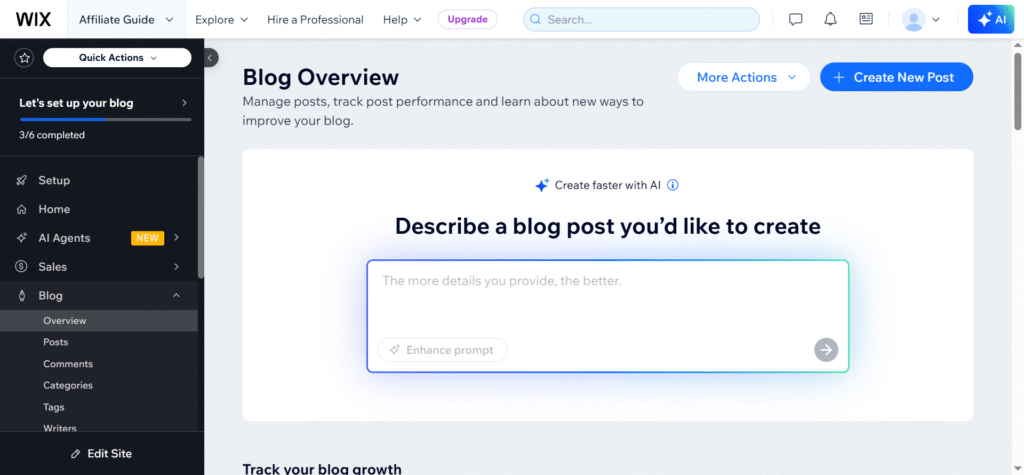
However, as content libraries become larger and more complex, Wix can feel more limited than WordPress.com. Advanced content organization features, deeper categorization options, and large-scale publishing workflows are not as robust. While Wix performs well for casual bloggers and smaller websites, WordPress.com remains the stronger choice for users planning to build content-rich websites, authority blogs, or long-term publishing platforms.
Winner: WordPress.com for its superior blogging tools, advanced content organization capabilities, and ability to manage large-scale content growth efficiently.
2. Ease of Use and Design Flexibility
WordPress.com
WordPress.com strikes an impressive balance between ease of use and long-term design flexibility. New users can get online quickly thanks to managed hosting, automatic updates, built-in security, and a guided setup process. While there may be a slight learning curve compared to simpler website builders, the platform remains beginner-friendly and provides a solid foundation for future growth. The block editor makes it easy to create professional-looking pages while maintaining a structured and scalable website architecture.
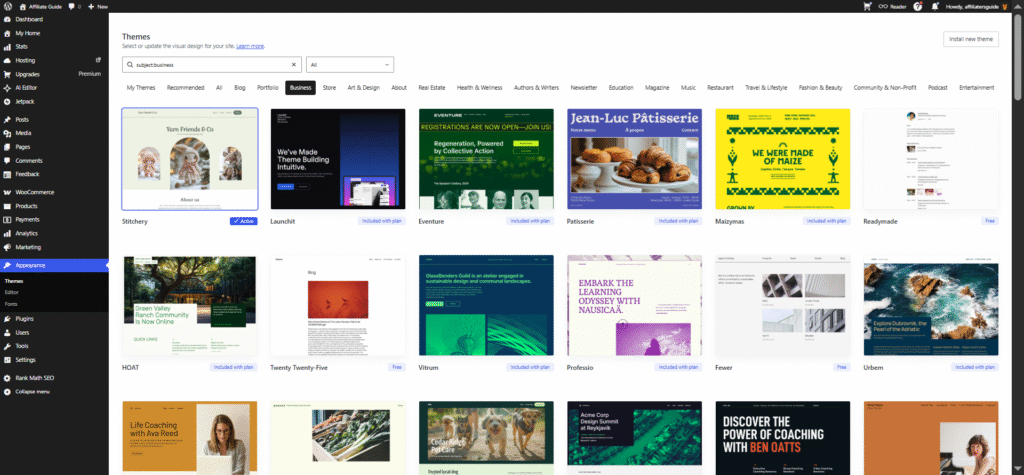
As users become more familiar with the platform, WordPress.com reveals its greatest strength: flexibility. A wide selection of themes, layout options, design settings, and advanced customization tools allow websites to evolve without major limitations. Higher-tier plans unlock additional capabilities such as custom CSS and enhanced design controls, making WordPress.com suitable for everything from personal blogs to business websites and online stores. This combination of usability and creative freedom ensures that websites can grow without requiring a platform change.
Wix
Wix is one of the most beginner-friendly website builders available. Its drag-and-drop editor allows users to create and customize pages visually, making it easy to build a professional-looking website without technical knowledge. Hosting, security, templates, and maintenance are included, reducing setup complexity and helping users launch websites quickly. For first-time website owners, the platform offers a smooth and intuitive experience from day one.
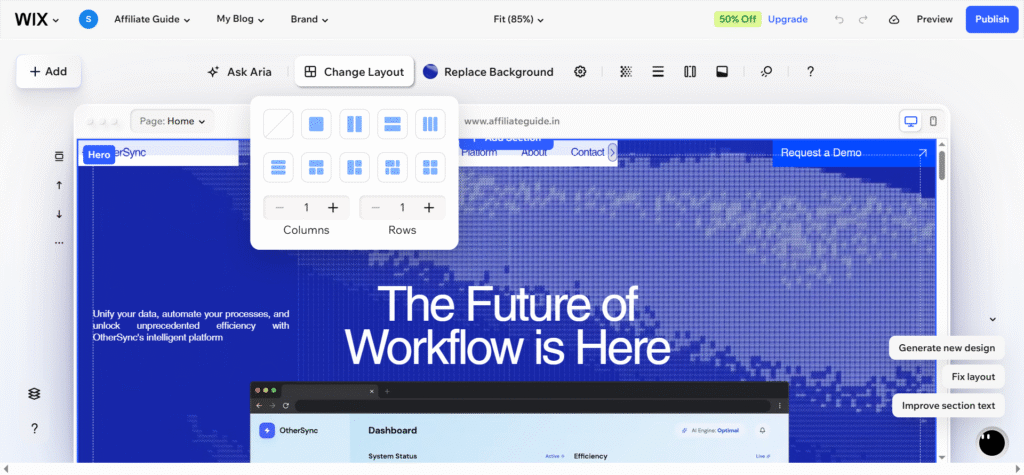
The visual editor also provides considerable creative freedom for basic website design. Users can move elements freely, customize layouts, and create attractive pages with minimal effort. However, as websites become more sophisticated, Wix’s design system can feel more restrictive than WordPress.com. Advanced customization options, scalable design frameworks, and deeper control over site structure are more limited, making Wix better suited for users who prioritize simplicity over long-term flexibility.
Winner: Wix
Wix delivers the easiest learning curve and quickest path to a finished website.
3. Theme and Plugin Ecosystem
WordPress.com
WordPress.com benefits from one of the largest website ecosystems in the world. Users can choose from a vast collection of professionally designed themes to create blogs, business websites, portfolios, online stores, and more. As website needs grow, premium themes and advanced customization options provide additional flexibility, helping users create a unique online presence without starting from scratch.
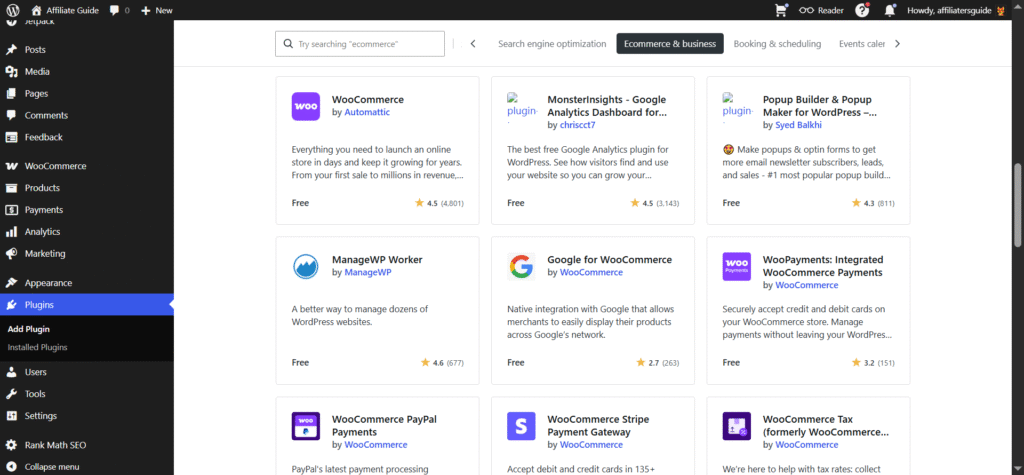
The platform becomes even more powerful through its extensive plugin ecosystem on eligible plans. Users can add SEO tools, contact forms, eCommerce features, analytics, security enhancements, and countless other capabilities with just a few clicks. Backed by the global WordPress community, WordPress.com offers access to extensive documentation, tutorials, and third-party integrations, making it easier to find solutions for almost any website requirement.
Wix
Wix offers a solid collection of templates and built-in applications that help users launch websites quickly. Its template library covers popular website categories, while the Wix App Market provides useful tools for forms, live chat, bookings, marketing, and analytics. For many small businesses and personal websites, these built-in options are more than enough to get started.
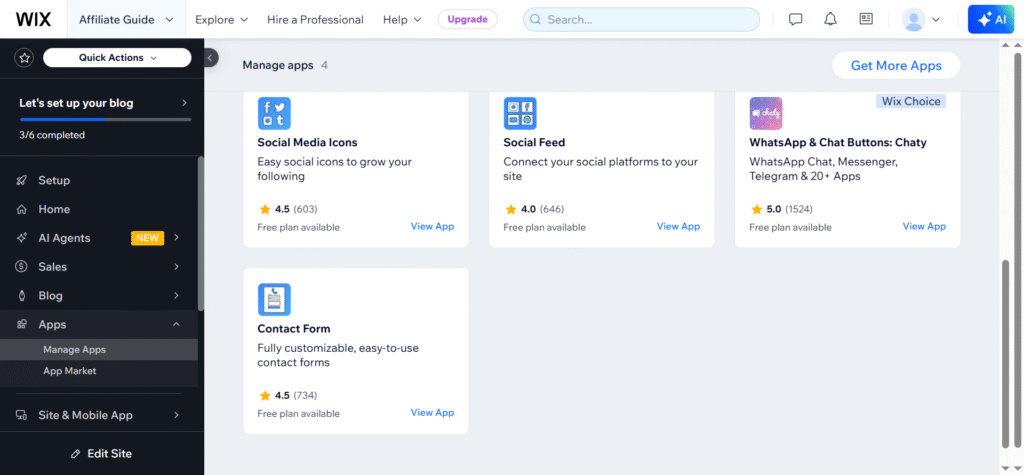
However, the Wix ecosystem is more controlled and limited compared to WordPress.com. While the available apps cover many common needs, users have fewer choices when looking for specialized features or advanced integrations. As website requirements become more complex, the broader theme and plugin ecosystem available through WordPress.com provides greater flexibility, scalability, and long-term growth potential.
Winner: WordPress.com for its massive theme library, powerful plugin ecosystem, extensive third-party integrations, and unmatched flexibility for future website growth.
4. SEO Capabilities
WordPress.com
WordPress.com provides a strong SEO foundation for bloggers, businesses, and content creators who want to increase their visibility in search engines. The platform includes essential SEO features such as customizable titles, meta descriptions, XML sitemaps, clean URLs, and mobile-friendly themes. Its content-focused structure, including categories, tags, and organized archives, also helps search engines understand and index website content more effectively.
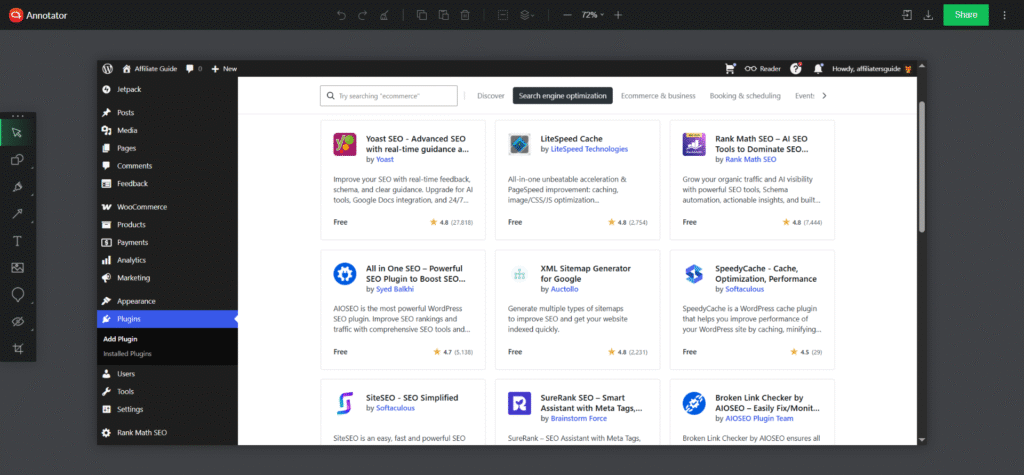
On eligible plans, users can further enhance their SEO efforts with powerful tools and integrations. Advanced optimization options, schema support, performance enhancements, and detailed SEO plugins help website owners fine-tune their content for better rankings. Combined with fast hosting and responsive design, WordPress.com offers the flexibility and control needed to support long-term organic traffic growth.
Wix
Wix includes beginner-friendly SEO tools that make it easy for new website owners to implement basic optimization practices. Features such as editable page titles, meta descriptions, automatic sitemaps, and the Wix SEO Setup Checklist help users improve their site’s search visibility without requiring technical expertise. This makes Wix a good choice for those who want a simple approach to SEO.
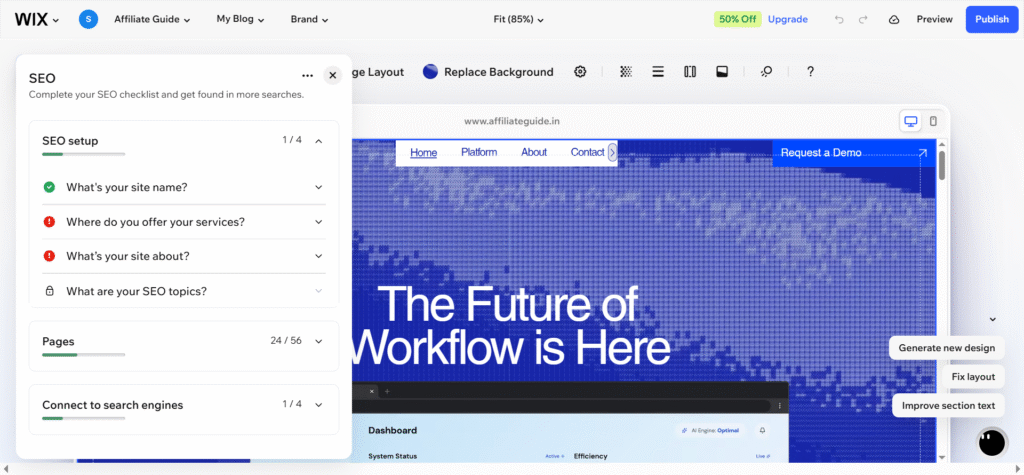
While Wix covers most essential SEO requirements, its optimization options are generally less extensive than those available through WordPress.com. Advanced users may find fewer opportunities for customization and deeper technical control. For small websites and local businesses, Wix provides solid SEO functionality, but WordPress.com offers greater flexibility for users pursuing aggressive content marketing and long-term search growth strategies.
Winner: WordPress.com for its stronger SEO ecosystem, advanced optimization capabilities, and greater control over long-term search engine growth.
5. Scalability and Long-Term Growth
WordPress.com
WordPress.com is built with long-term growth in mind, making it an excellent choice for users who expect their websites to evolve over time. Whether you start with a personal blog, business website, portfolio, or online store, the platform can comfortably handle increasing traffic, larger content libraries, and expanding functionality. Its managed infrastructure ensures performance remains reliable as your audience grows, while advanced features such as eCommerce, memberships, multi-author publishing, and third-party integrations allow your website to scale without requiring a move to another platform.
Wix
Wix provides a reliable platform for small and medium-sized websites, offering a simple and fully managed experience that works well for personal sites, portfolios, local businesses, and modest online stores. Users can focus on growing their websites without worrying about hosting, maintenance, or technical infrastructure, making Wix an attractive option for those who prioritize convenience and simplicity.
Winner: WordPress.com
WordPress.com combines powerful scalability with long-term platform stability, making it the better choice for users who view their website as a long-term investment. Its open ecosystem, content portability, extensive customization options, and ability to support growth from startup level to enterprise scale give it a clear advantage over Wix for future-focused website owners.
6. Monetization Opportunities
WordPress.com
WordPress.com offers excellent monetization opportunities for bloggers, creators, and business owners looking to generate revenue from their websites. Users can monetize through display advertising, affiliate marketing, sponsored content, memberships, donations, subscriptions, and online stores. The platform’s flexibility allows website owners to choose the monetization methods that best fit their audience and business goals.
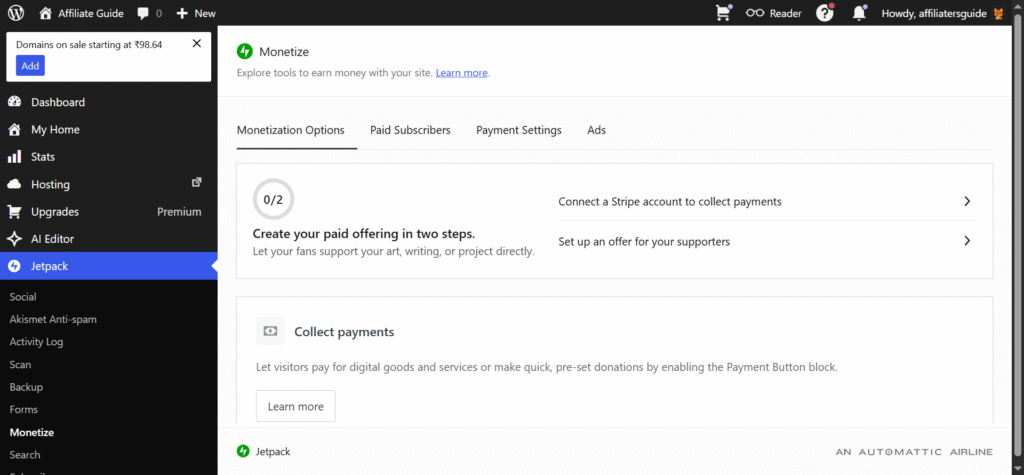
As a website grows, WordPress.com makes it easier to expand revenue streams through advanced tools and integrations. Users can sell physical products, digital downloads, services, online courses, and premium content while maintaining full control over their business model. This flexibility makes WordPress.com particularly attractive for content creators and entrepreneurs who want to build multiple income sources from a single website.
Wix
Wix supports several monetization methods, including online stores, memberships, bookings, and digital product sales. Its built-in business tools make it easy for beginners to start selling products or services without dealing with complex setup processes. For small businesses and personal brands, these features can provide a straightforward path to generating online revenue.
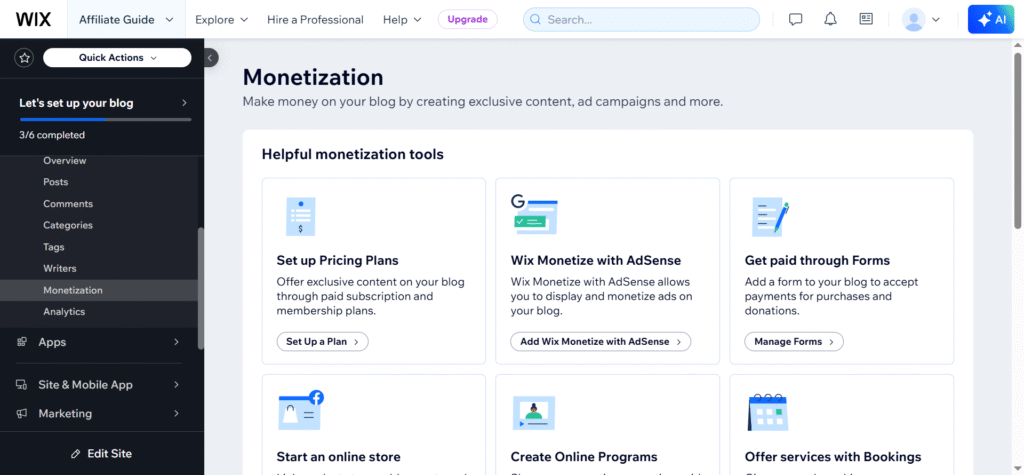
However, Wix offers fewer customization and integration options for advanced monetization strategies. As businesses grow, users may encounter limitations when implementing specialized membership systems, affiliate-focused content strategies, or highly customized sales funnels. While Wix can support basic monetization needs, WordPress.com provides greater flexibility and scalability for users seeking to maximize long-term earning potential.
Winner: WordPress.com for its broader monetization options, greater flexibility, and ability to support multiple revenue streams as a website grows.
7. E-commerce Functionality
WordPress.com
WordPress.com offers powerful e-commerce capabilities through its integration with WooCommerce, one of the most popular online store platforms in the world. Users can sell physical products, digital downloads, subscriptions, services, and memberships while benefiting from extensive customization options. The platform supports a wide range of payment gateways, shipping methods, inventory management tools, and marketing integrations, making it suitable for businesses of all sizes.
Wix
Wix includes built-in e-commerce tools that make it easy for beginners and small businesses to start selling online. Users can create product listings, accept payments, manage inventory, and offer digital products without dealing with complex setup processes. The platform’s user-friendly interface allows store owners to launch an online shop quickly and manage day-to-day operations with minimal technical knowledge.
While Wix provides a solid foundation for smaller online stores, it offers fewer customization and expansion options than WordPress.com. Advanced selling features, complex shipping rules, large product catalogs, and specialized integrations can be more limiting as a business grows. For simple e-commerce needs, Wix performs well, but WordPress.com offers greater flexibility and scalability for businesses aiming to build a long-term online retail presence.
Winner: WordPress.com for its WooCommerce-powered ecosystem, advanced customization options, and ability to support e-commerce businesses at virtually any scale.
8. Maintenance and Technical Burden
WordPress.com
WordPress.com significantly reduces the technical workload associated with running a website. Hosting, security updates, backups, performance optimization, and infrastructure management are handled by the platform, allowing users to focus on creating content and growing their online presence. This managed approach provides many of the benefits of WordPress without the complexity often associated with self-hosted websites.
Wix
Wix is designed to minimize maintenance as much as possible. Hosting, security, updates, backups, and performance management are all handled automatically behind the scenes, requiring virtually no technical involvement from users. This makes Wix particularly appealing to beginners and small business owners who want a simple, hands-off website management experience.
The platform’s fully managed environment allows users to focus almost entirely on content, design, and business operations. However, the trade-off for this simplicity is reduced flexibility and customization compared to WordPress.com. While Wix offers one of the easiest maintenance experiences available, WordPress.com provides a stronger balance between low maintenance requirements and long-term website growth potential.
Winner: Tie (Slight Edge to Wix for Simplicity)
Wix offers the lowest maintenance burden and requires almost no technical involvement. However, WordPress.com comes remarkably close while providing significantly greater flexibility, customization, and growth potential. For most users, WordPress.com delivers the better overall balance of convenience and capability.
9. Overall Value and Long-Term Investment
WordPress.com
WordPress.com delivers outstanding long-term value for users who view their website as a serious business, content platform, or growth asset. While there may be a slightly larger learning curve initially, the platform rewards that investment with greater flexibility, stronger SEO capabilities, advanced monetization options, powerful content management tools, and excellent scalability. As your website grows, WordPress.com can grow alongside it without forcing you to switch platforms.
Wix
Wix provides good value for users who prioritize simplicity, speed, and ease of use. The platform allows beginners to launch professional-looking websites quickly without needing technical skills or extensive setup. For personal websites, portfolios, local businesses, and small projects, Wix offers a convenient all-in-one solution that can deliver results with minimal effort.
However, as website requirements become more advanced, users may encounter limitations in customization, scalability, integrations, and monetization options. While Wix remains an excellent choice for straightforward websites, its long-term value may be lower for users planning significant growth. For those seeking a platform that can support evolving business needs and ambitious online goals, WordPress.com offers a stronger long-term return on investment.
Winner: WordPress.com
When all factors are considered, WordPress.com provides the best overall value. Its superior flexibility, scalability, content management capabilities, SEO potential, monetization opportunities, and long-term viability make it the better investment for bloggers, creators, businesses, and anyone building a website with future growth in mind.
Winner Scorecard
| Category | Winner |
|---|---|
| Blogging & Content | WordPress.com |
| Ease of Use | Wix |
| Design Flexibility | WordPress.com |
| Theme Ecosystem | WordPress.com |
| SEO | WordPress.com |
| Scalability | WordPress.com |
| Monetization | WordPress.com |
| Ecommerce | WordPress.com |
| Maintenance | Wix (slight edge) |
| Overall Value | WordPress.com |
Conclusion
Choose WordPress.com If You:
- Plan to blog regularly
- Want better SEO opportunities
- Intend to monetize your site
- Need room for future growth
- Want a platform that scales with your business
Choose Wix If You:
- Need a website online today
- Prefer drag-and-drop editing
- Want minimal setup and maintenance
- Are building a simple brochure-style website
Ready to build a website that can grow with your business? Start with WordPress.com and take advantage of its powerful publishing, SEO, and growth-focused tools.
👉 Get Started with WordPress.com Today
🙏 Disclosure & Thank You
This post contains affiliate links. As an affiliate partner of WordPress.com , I may earn a commission if you purchase through these links.
This comes at no additional cost to you and helps support the content published on DreamHosters. Thank you for your support.
Frequently Asked Questions (FAQs)
1. Is WordPress.com better than Wix for blogging?
Yes, WordPress.com is generally the better choice for blogging. It was built around content publishing and offers advanced features such as categories, tags, archives, post scheduling, multi-author support, and stronger content organization. While Wix includes blogging tools, WordPress.com provides a more robust platform for growing a blog into a serious content website.
2. Which platform is easier to use for beginners: WordPress.com or Wix?
Wix is slightly easier for complete beginners because of its drag-and-drop editor and guided setup process. However, WordPress.com remains beginner-friendly while offering greater flexibility and scalability. Users who invest a little time learning WordPress.com often benefit from more customization and growth opportunities in the long run.
3. Is WordPress.com better for SEO than Wix?
Both platforms offer solid SEO features, but WordPress.com provides more advanced SEO capabilities and greater flexibility as your website grows. Its content-focused architecture, structured organization, and access to powerful SEO tools make it a stronger option for bloggers, businesses, and marketers who rely on organic search traffic.
4. Can I build an online store with both WordPress.com and Wix?
Yes, both platforms support eCommerce functionality. Wix is a good choice for small online stores that need a quick and simple setup. However, WordPress.com, especially when paired with WooCommerce, offers greater flexibility, scalability, and customization for businesses planning to expand their product catalog or grow their online sales over time.
5. Which platform offers better long-term value in 2026?
For most bloggers, content creators, affiliate marketers, and businesses, WordPress.com offers better long-term value. It combines strong blogging tools, advanced SEO capabilities, flexible monetization options, and excellent scalability in a managed hosting environment. While Wix is ideal for quick website creation, WordPress.com is better suited for websites that are expected to grow and evolve over the coming years.
“`html “`